
How Much Does Veo 3 Cost Per Month? Pro vs Ultra Plans Compared + Money-Saving Tips
Last week in an AI creator group, a friend excitedly shared that he’d subscribed to Veo 3’s Ultra plan at $249 per month. I was shocked - that’s more expensive than my Netflix, Spotify, and ChatGPT subscriptions combined! After digging into the details, I realized most people don’t actually need Ultra at all. The Pro plan at just $19.99/month is more than enough for the average user.
To be honest, Google didn’t exactly make their pricing crystal clear this time. Many people look at the two tiers and feel lost: What’s the actual difference? Which plan should I choose based on my monthly video output? How do credits work? Are there any hidden costs?
I spent an entire day combing through official documentation, community discussions, and talking to actual users. This article will clarify Veo 3’s subscription plans and cost calculations so you don’t waste money on the wrong tier.
Here’s what I’ll cover:
- The real differences between Pro and Ultra (not the official marketing speak)
- How credit consumption actually works (what does one video really cost)
- How to choose the most cost-effective plan based on your usage
- 5 practical money-saving tips
- How Veo 3’s pricing compares to other AI video tools
By the end of this article, you’ll be equipped to make the best choice for your needs.
Quick Answer: Veo 3’s Two Subscription Plans at a Glance
Alright, let’s start with the straight answer. Veo 3 currently offers two official subscription plans through the Google AI platform:
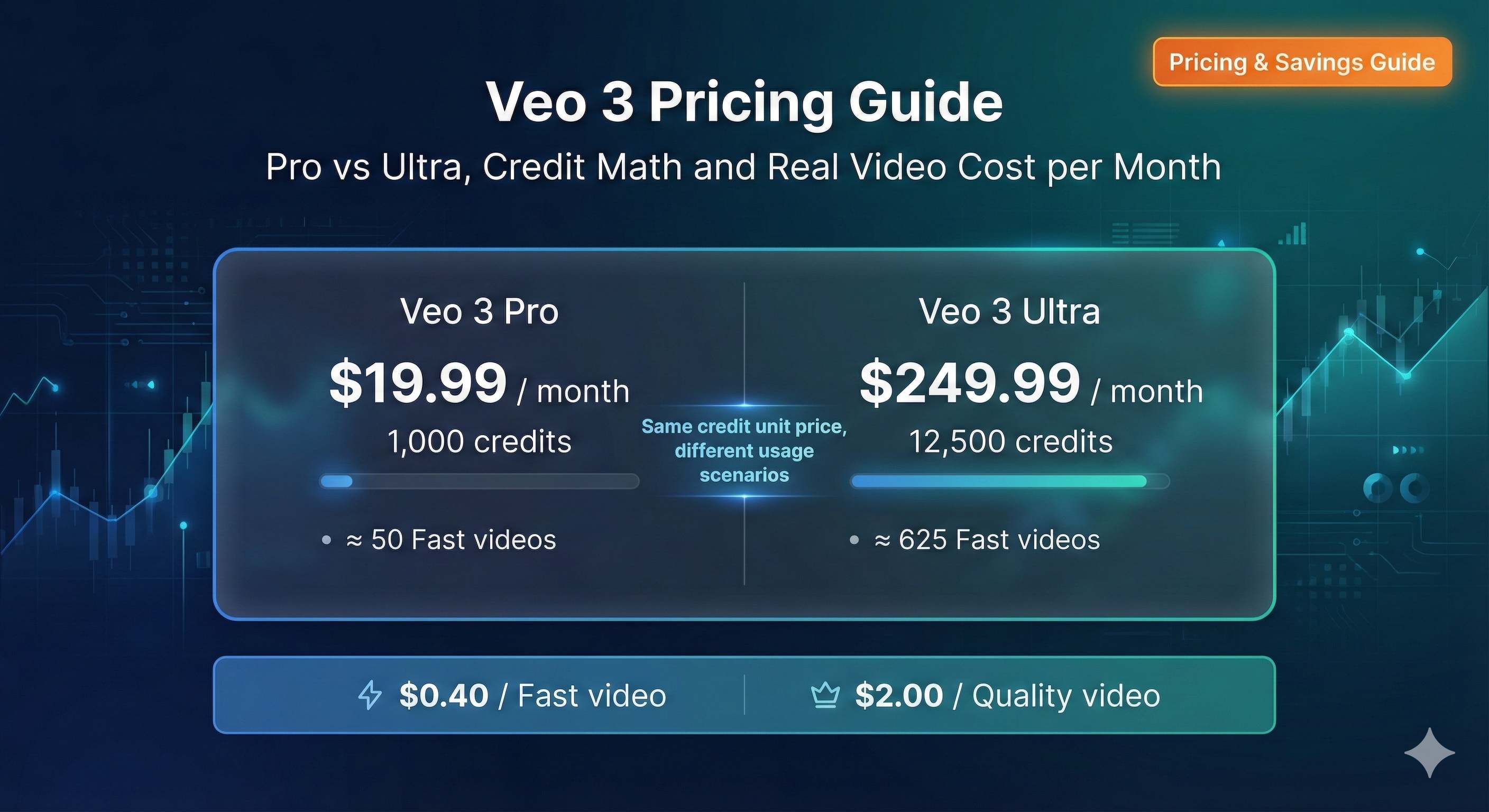
Google AI Pro - $19.99/month
- 1,000 credits per month
- Generates approximately 50 Fast mode videos or 10 Quality mode videos
- Includes 2TB cloud storage
- First month free (credit card required)
- Perfect for light users and individual creators
Google AI Ultra - $249.99/month
- 12,500 credits per month
- Generates approximately 625 Fast mode videos or 125 Quality mode videos
- Includes 30TB cloud storage + YouTube Premium and other perks
- 50% off for first 3 months ($124.99/month) for new users
- Designed for professional teams and heavy users
I’ve created a comparison table for easy reference:
| Feature | Google AI Pro | Google AI Ultra |
|---|---|---|
| Monthly Fee | $19.99 | $249.99 ($124.99 first 3 months) |
| Monthly Credits | 1,000 | 12,500 |
| Fast Videos | ~50 (8 sec each) | ~625 (8 sec each) |
| Quality Videos | ~10 (8 sec each) | ~125 (8 sec each) |
| Cloud Storage | 2TB | 30TB |
| Commercial License | Annual only | Annual only |
| Best For | Individuals/Light users | Teams/Professional users |
You might wonder: Why is Ultra so much more expensive? It’s all about the credit volume. Pro gives you 1,000 credits, while Ultra gives you 12,500 - that’s 12.5x more. But is the price exactly 12.5x higher? Actually, the cost per credit is identical:
- Pro: $19.99 ÷ 1,000 = $0.02/credit
- Ultra: $249.99 ÷ 12,500 = $0.02/credit
Wait, the unit price is the same? Exactly. Google’s smart strategy isn’t about offering volume discounts - it’s about “bulk volume.” If you’re a heavy user, Pro’s 1,000 credits won’t cut it. You’ll either need to buy extra credits monthly (more expensive) or upgrade to Ultra.
Here’s a crucial detail many people miss: Commercial licenses are only available for annual subscriptions. If you subscribe monthly, even with Ultra, your generated videos can’t be used for commercial purposes. This matters a lot for business users - don’t get caught off guard.
Credit Consumption Rules Explained: What Does One Video Actually Cost?
Now for the most critical part. Many people struggle to understand Veo 3’s billing because it uses a “credit system” instead of simply stating “X dollars per video” like some other tools.
Let’s start with the core rules:
Veo 3 has two generation modes:
- Fast mode - Quick generation, slightly lower quality, consumes 20 credits per 8-second video
- Quality mode - Slower generation, better quality, consumes 100 credits per 8-second video
Yes, you read that right - Quality mode uses 5x more credits than Fast. This is why I’ll show you how to strategically use Fast mode to save money.
How does video length affect costs?
This is a trap I initially missed. Veo 3 can only generate 8-second videos at a time. If you want a 16-second video, you need to generate it twice, doubling the credit cost:
| Video Length | Fast Mode Credits | Quality Mode Credits |
|---|---|---|
| 8 sec | 20 | 100 |
| 16 sec (2 generations) | 40 | 200 |
| 24 sec (3 generations) | 60 | 300 |
| 30 sec (4 generations) | 80 | 400 |
When planning your video length, try to stick to multiples of 8 seconds to avoid waste. For example, if you need a 9-second video, you’ll actually need to generate 16 seconds, consuming credits for 16 seconds while only using 9.
Real-world example: What can Pro’s 1,000 credits do?
Let me use a social media content creator as an example. They need to produce 2-3 short videos per week for TikTok:
Scenario A: All Fast mode
- Each 16-second video (2 generations) = 40 credits
- 1,000 credits ÷ 40 = 25 videos
- Lasts 6-8 weeks, basically 2 months
Scenario B: All Quality mode
- Each 16-second video = 200 credits
- 1,000 credits ÷ 200 = 5 videos
- Only 2 weeks, less than half a month
Scenario C: Mixed approach (smart strategy)
- Important videos in Quality: 3 x 200 = 600 credits
- Regular videos in Fast: 20 x 20 = 400 credits
- Total: 1,000 credits, ensuring quality for key content while maintaining consistent output
This creator ultimately chose Scenario C, spending $19.99/month with an average cost of less than $1 per video. They said it’s much cheaper than hiring a video editor.
What does a single video actually cost?
Let me break it down for you:
Pro plan ($19.99/month, 1,000 credits)
- Fast video (8 sec): $19.99 ÷ 50 = $0.40/video
- Quality video (8 sec): $19.99 ÷ 10 = $2.00/video
Ultra plan ($249.99/month, 12,500 credits)
- Fast video (8 sec): $249.99 ÷ 625 = $0.40/video
- Quality video (8 sec): $249.99 ÷ 125 = $2.00/video
See that? The unit cost is identical! So choosing which plan depends entirely on your usage volume, not “expensive = better value.”
What happens when you run out of credits?
If you exhaust your monthly credits, you can purchase more:
- 2,500 credits = $24.99
- 5,000 credits = $49.99
- 20,000 credits = $199.99
The additional credit pricing (about $0.01/credit) looks cheaper than the subscription, but you must first buy the $19.99 or $249.99 plan, so the actual cost is higher.
And honestly, if you’re frequently buying extra credits, it’s a sign you should switch plans.
Pro vs Ultra: Which Plan Is Right for You?
Now that you understand credit calculations, here’s the most important question: Which should I choose?
I’ve created a comparison guide - just match your situation:
Choose Pro ($19.99/month) if:
- You’re an individual creator, not a team
- You generate fewer than 10 videos per week
- Fast mode is sufficient for most needs
- You have a limited budget and want to test the waters
- You don’t need commercial licensing (personal use only)
Choose Ultra ($249.99/month) if:
- You’re a video production team or studio
- You need to generate 5+ videos daily
- You heavily rely on Quality mode
- You have commercial use requirements (requires annual payment)
- You have ample budget and prioritize efficiency
Still unsure? Check your usage frequency:
I’ve created a more intuitive table based on monthly video generation:
| Monthly Output (8-sec Fast videos) | Credits Used | Pro Sufficient? | Recommended Plan |
|---|---|---|---|
| 1-20 videos | 400 | ✅ Yes | Pro |
| 21-50 videos | 1,000 | ✅ Just right | Pro |
| 51-100 videos | 2,000 | ❌ Exceeded | Ultra |
| 100+ videos | 2,000+ | ❌ Far exceeded | Ultra |
If you primarily use Quality mode, divide the numbers above by 5.
Breakeven analysis: When should you upgrade to Ultra?
Let me run the numbers. Suppose Pro’s 1,000 credits aren’t enough and you need to buy extra:
- Pro base: $19.99
- Extra 2,500 credits: $24.99
- Total: $44.98 (for 3,500 credits)
If you’re buying 5,000+ extra credits monthly, the total becomes:
- Pro + 5,000 credits = $19.99 + $49.99 = $69.98
Need even more?
- Pro + 20,000 credits = $19.99 + $199.99 = $219.98
See the pattern? When your total credits needed exceed around 10,000, Ultra ($249.99 with 12,500 credits) becomes more economical. Plus, Ultra includes 30TB storage and other benefits.
Real user case studies:
Let me share some actual user experiences:
Case 1: Independent Blogger - Chose Pro
- Use case: 2 educational short videos per week
- Mode: Primarily Fast, occasionally Quality
- Monthly consumption: ~600 credits
- Cost: $19.99/month
- Review: “Completely sufficient, great value”
Case 2: Advertising Agency - Chose Ultra
- Use case: Creating ad materials for clients
- Mode: All Quality
- Monthly consumption: ~10,000 credits
- Cost: $249.99/month (first 3 months $124.99)
- Review: “We bill clients per project, so the cost is completely transferable”
Case 3: Startup Team - Upgraded from Pro to Ultra
- Initially chose Pro, found themselves buying 5,000+ extra credits monthly
- Calculated monthly spend at $70-80
- Switched to Ultra and actually saved money
My recommendation:
If you’re new, start with Pro. Google offers a free first month (Pro) or 50% off for 3 months (Ultra), perfect for testing your actual usage. After one month, check your credit consumption:
- Used less than 500 credits → Continue with Pro, or consider reducing usage
- Used 800-1,000 credits → Pro is just right
- Frequently exceeding credits → Time to upgrade to Ultra
Don’t jump straight to Ultra unless you’re certain you’re a power user.
Hidden Fees and Money-Saving Tips
Now that we’ve covered official pricing, let’s talk about potential pitfalls and saving strategies.
Hidden cost checklist:
Commercial licensing (implicit cost)
- Monthly subscriptions: No commercial use, personal only
- Annual subscriptions: Full commercial licensing included
- Annual Pro: $19.99 x 12 = $239.88/year
- Annual Ultra: $249.99 x 12 = $2,999.88/year (may have discounts)
If you need commercial rights, calculate costs based on annual payment. Many people miss this when subscribing and end up with videos they can’t use for business projects.
Extra credit purchases
- As mentioned, buying extra credits seems cheaper per unit, but requires base subscription
- Frequent overages may cost more than upgrading to Ultra
Video length trap
- Charged per 8-second increment, not actual length
- 9-second video = pay for 16 seconds
- 25-second video = pay for 32 seconds
5 Practical Money-Saving Tips:
Tip 1: Prioritize Fast mode - the quality difference isn’t as big as you think
Honestly, the visual difference between Fast and Quality isn’t that noticeable, especially on platforms like TikTok or Instagram where videos get compressed anyway. Fast mode saves 80% of credits - it’s a no-brainer.
I ran a comparison test showing Fast and Quality videos to 10 friends - only 2 could tell the difference. So unless it’s a particularly important project (like a client pitch), Fast mode is sufficient.
Tip 2: Plan video lengths in 8-second multiples
Avoid awkward lengths like 9, 17, or 26 seconds. Stick to 8, 16, or 24 seconds to maximize each generation.
Example:
- 25-second video = 4 generations = 80 credits (Fast)
- 24-second video = 3 generations = 60 credits (Fast)
- Saves 20 credits - that’s one entire video worth of credits
Tip 3: Maximize new user promotional periods
- Pro first month free: Test pressure-free to see if it meets your needs
- Ultra 50% off first 3 months: From $249.99 to $124.99, saves $375
My advice: If you think you might need Ultra, subscribe during the promotional period. The savings equal several months of Pro. But remember to evaluate before the promo ends and downgrade if necessary.
Tip 4: Mix Fast and Quality modes
Don’t go all-in on one mode. My approach:
- 80% of videos in Fast (daily content, tests, drafts)
- 20% of videos in Quality (important content, client deliverables, key promotions)
This balances quality with cost control.
Tip 5: Teams should strategically allocate credits
If you’re a small team, consider sharing one Ultra account with pre-planned credit allocation:
- Define monthly quotas per person
- Prioritize credits for high-priority projects
- Regular usage reviews
Note: Account sharing may involve terms of service issues - consult official policy.
Pro tip:
If you’re a student or educator, watch for Google’s education discount programs. While Veo 3 doesn’t currently have official education pricing, Google One’s other services do, and it may expand to AI products in the future.
Veo 3 vs Other AI Video Tools: Price Comparison
Finally, let’s see how Veo 3’s pricing stacks up against other mainstream AI video tools.
Mainstream AI Video Tool Price Comparison:
| Tool | Basic Plan | Premium Plan | Video Length Limit | Cost per Video |
|---|---|---|---|---|
| Veo 3 | $19.99/mo | $249.99/mo | 8 sec/generation | $0.40-$2.00 |
| Runway Gen-3 | $15/mo | $95/mo | 5-10 sec | $1.50-$3.00 |
| Pika | $10/mo | $35/mo | 3 sec | $2.00-$4.00 |
| Kling AI | $8/mo | $25/mo | 5 sec | $1.00-$2.50 |
Note: Cost per video based on official pricing and credit/length calculations, for reference only.
Comparative Analysis:
Veo 3’s Advantages:
- Lowest per-video cost - Fast mode at $0.40/video is 1/3 of Runway’s cost
- Longer video length - 8 seconds per generation vs Pika’s 3 seconds
- Consistent quality - Google’s technical foundation ensures high success rates
- No queue waiting - Pro and Ultra users get priority processing
Veo 3’s Disadvantages:
- Higher base tier pricing - $19.99 is double Pika’s $10
- High commercial licensing barrier - Requires annual payment, unlike some tools that allow monthly commercial use
- No free tier - Runway and others offer limited free trials
Value Analysis:
I calculated how many videos you can generate on each platform with the same budget ($50/month):
Veo 3 (Pro $19.99 + extra credits):
- Base 1,000 credits + additional 2,500 credits ($24.99) = 3,500 credits
- Fast mode: 3,500 ÷ 20 = 175 8-second videos
- Total duration: 175 x 8 = 1,400 seconds = 23.3 minutes
Runway Gen-3 (Basic $15/month):
- 625 monthly credits (official allocation)
- About 10 credits per 5-second video
- Can generate: ~62 5-second videos
- Total duration: 62 x 5 = 310 seconds = 5.2 minutes
Pika (Premium $35/month):
- 2,000 monthly credits
- About 30 credits per 3-second video
- Can generate: ~66 3-second videos
- Total duration: 66 x 3 = 198 seconds = 3.3 minutes
See the difference? With the same budget, Veo 3 generates 4-5x more total video time than Runway and 7x more than Pika. That’s remarkable value.
When should you choose other tools?
While Veo 3 offers great value, it’s not perfect for every use case:
- Choose Runway: Need stronger stylistic control and effects
- Choose Pika: Extremely limited budget, simple testing only
- Choose Kling: Need better Chinese prompt support
Third-party API Temptations and Risks
You might see third-party platforms advertising “cheaper Veo 3 API” access online. While some third-party providers offer lower prices, proceed with caution:
Potential Risks:
- Service stability - Possible outages or generation failures
- Data security - Video content privacy concerns
- Terms of service - Potential compliance issues
- Commercial licensing - Unclear commercial rights for generated videos
Recommendation: For professional or commercial projects, stick with official channels for peace of mind. For personal learning and research, you can cautiously evaluate third-party options, but I don’t recommend them for important projects.
Bottom line: From a pure value perspective, Veo 3 is one of the most affordable high-quality AI video tools on the market. Especially in Fast mode at just $0.40 per video, it has a clear pricing advantage.
Summary and Recommendations
Alright, after all that, let’s return to the original question: How much does Veo 3 cost per month?
The answer: It depends on your usage volume.
- If you’re an individual creator making a few videos weekly, Pro at $19.99/month is completely sufficient
- If you’re a professional team with high-frequency generation needs, Ultra at $249.99/month is the right choice
More importantly, don’t let the price intimidate you. Let me run the numbers:
Suppose you’re a social media creator who previously hired editors at $10-20 per video. Now using Veo 3’s Pro plan at $19.99/month (about $20), you can generate 25-50 videos, averaging less than $1 per video. That’s incredible value.
My final recommendations:
- Start with Pro if you’re new - First month free, no reason not to try
- Evaluate after one month - Check actual credit consumption
- Upgrade to Ultra if needed - Don’t rush into the premium tier
- Use Fast mode frequently - Sufficient for 80% of scenarios
- Mind commercial licensing - Commercial use requires annual payment
Remember that friend from the beginning? He later realized he couldn’t use Ultra’s 12,500 credits and downgraded back to Pro, saving $230/month. Don’t become the next person who overspends.
Quick Decision Flowchart:
Do you need commercial licensing?
├─ Yes → Prepare for annual payment ($240-$3,000/year)
└─ No → Continue

Weekly video generation volume?
├─ <5 videos → Choose Pro ($19.99/month)
├─ 5-20 videos → Choose Pro with Fast mode
├─ 20-50 videos → Pro, may need extra credits
└─ >50 videos → Go straight to Ultra ($249.99/month)

Budget constrained?
├─ Yes → Pro + Fast mode combo
└─ No → Ultra with 3-month 50% off promo
One final reminder: Prices change, and this article reflects December 2025 pricing. Always check Google One’s official website for current rates before subscribing.
That’s it! You should now be equipped to make the best choice for your needs. If you have questions, feel free to leave a comment!
Published on: Dec 4, 2025 · Modified on: Dec 15, 2025

Related Posts

Complete Guide to Veo 3 Audio Generation: How to Add AI Voice and Music to Videos (With Prompt Templates)
The Complete Guide to Veo 3 Character Consistency: Creating Coherent Multi-Shot Videos with Scenebuilder

Comments
Sign in with GitHub to leave a comment