
Docker vs Virtual Machines: A 5-Minute Guide to Performance Differences and When to Use Each
Introduction
Last week in our team meeting, my boss suddenly asked: “Are we using Docker or VMs for the new project?”
I froze for three seconds. Honestly, I’ve used both, but to clearly explain the difference… I was stumped. Back at my desk, I went on a research spree and found that articles online either got too theoretical (throwing around terms like namespaces and cgroups) or just said “Docker is lighter” without explaining what that actually means—how much lighter? What’s the real performance difference? When should you use which?
None of them made it crystal clear.

After three days of digging, I finally figured it out. Today, I’ll explain the Docker vs VM difference in the simplest way possible. By the end, you’ll understand: the fundamental difference (I found a great analogy), the actual performance gap (with real data), and a decision tree to help you choose the right solution instantly.
The Core Difference—Shipping Containers vs Separate Apartments
Let me start with an easy-to-understand analogy.
Virtual machines are like separate apartments in a building. Each apartment has its own kitchen, bathroom, and utilities—a complete living unit. You live on the 2nd floor, your neighbor on the 3rd, completely isolated from each other. Each VM runs a complete operating system (Windows, Linux, etc.) with its own kernel, drivers, and system services—the full package from head to toe.
Docker containers are like shipping containers at a port. All containers share the port’s infrastructure—cranes, power systems, road networks. Each container only holds the application and its dependencies, without needing its own complete infrastructure. Docker containers share the host machine’s operating system kernel, packaging only the application and its runtime environment.
This difference might seem small, but the impact is comprehensive.
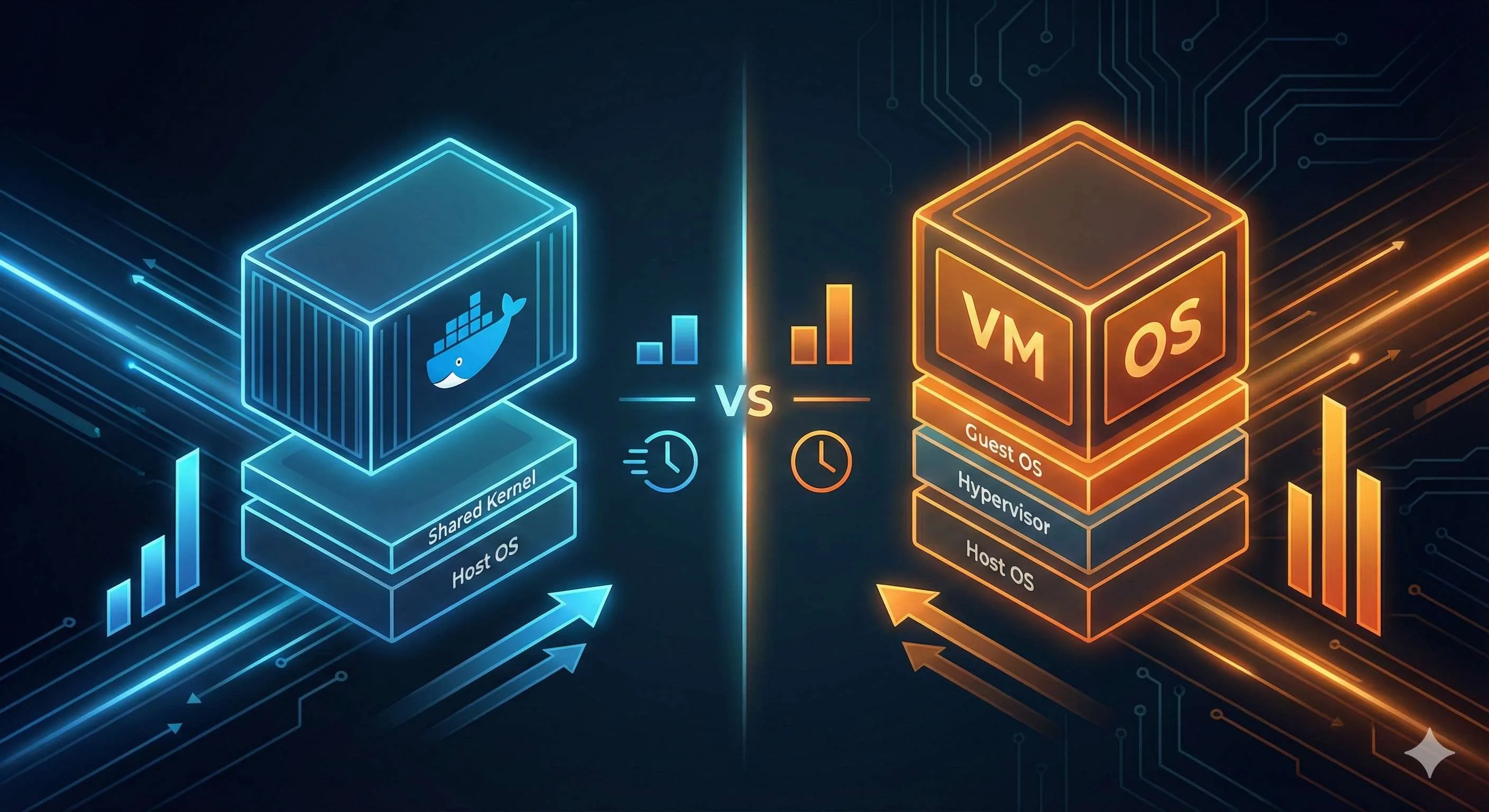
From an architectural perspective, VMs carry two extra layers of “baggage”: the Guest OS and the Hypervisor (virtualization layer). The Hypervisor must emulate an entire hardware environment—CPU, memory, disk, network cards, everything virtualized. When a VM starts, it must boot this complete OS, load the kernel, initialize services—like restarting a computer.
Docker? It runs directly on the host kernel. Starting a container is just starting a process—instant. No virtualization overhead, no extra OS layer, incredibly lightweight.
You might wonder: isn’t sharing a kernel problematic? I’ll address this later—it’s actually Docker’s weakness in terms of isolation compared to VMs. But it’s also its strength—fast, light, and resource-efficient.
Understanding this fundamental difference ties together everything about performance comparison and use cases that follow.
Performance Showdown—Let the Data Speak
Enough theory, let’s look at the numbers.
Startup Speed: Seconds vs Minutes
Last week I tested this: booting a configured VM (2 cores, 4GB RAM) and waiting until I could SSH in took nearly 4 minutes. During that time, I made coffee and scrolled through social media.
The same Redis service with Docker? 3 seconds.
Done before I could let go of my mouse.
This isn’t a fluke. VMs need to load a complete operating system—kernel initialization, system service startup, network configuration, the works. Docker starting a container is just starting a process; the kernel is already running, so it just gets to work.
Resource Usage: MB vs GB Scale
Even more dramatic is resource consumption. Docker’s own overhead? 6-8MB of memory. Yes, you read that right—single-digit megabytes.
A Redis container I ran—how much did it actually use? CPU 0.08%, memory 2.6MB. Practically invisible.
VMs? Even running nothing, just the OS alone consumes 1-2GB of memory minimum. Running a MySQL VM? 4GB baseline.
This leads to a harsh reality: on the same physical server, you can max out at a few dozen VMs, but Docker can run thousands. I’ve seen production environments where a 32-core, 128GB server ran over 800 Docker containers with room to spare. VMs? You’d struggle with 30.
Performance Overhead: Near-Native vs Noticeable Slowdown
Research institutions have conducted comparison tests showing Docker container performance matches native applications in almost all scenarios, sometimes even faster (due to no extra virtualization overhead). VMs? Typically 10-20% performance penalty.
CPU-intensive tasks especially show the difference. I tried compiling a large project: VM took 25 minutes, container took 21 minutes, bare metal 20 minutes. Containers have virtually no performance loss.
Here’s a comparison table that makes it crystal clear:
| Dimension | Docker Containers | Virtual Machines (VMware/VirtualBox) |
|---|---|---|
| Startup Time | Seconds (1-5s) | Minutes (2-5min) |
| Memory Usage | MB scale (2-50MB) | GB scale (1-4GB minimum) |
| Density per Host | Hundreds to thousands | A few dozen |
| Performance Overhead | <5% | 10-20% |
| Image Size | Tens to hundreds of MB | Several to tens of GB |
After seeing this table, you understand why microservice architectures are migrating to Docker en masse. Resource utilization can differ by an order of magnitude—who wouldn’t be tempted?
Isolation and Security—Stronger Isn’t Always Better
After covering the performance advantages, let’s talk about Docker’s weakness.
Isolation Level Differences
VMs provide hardware-level isolation. Each VM has its own independent OS kernel, equivalent to completely separate computers. If VM A gets hacked, theoretically the attacker can’t jump to VM B or the host machine. This is “hard isolation.”
Docker? Process-level isolation. All containers share the host kernel, isolated only through Linux namespaces and cgroups technologies. Sounds less secure, right?
And it is. Container Escape attacks specifically target Docker—if a hacker finds a container vulnerability, they might break through isolation and attack the host directly. Last year’s CVE vulnerability (CVE-2024-21626) allowed attackers to escape from containers to the host machine.
Do VMs have this risk? Yes, but it’s much harder.
When Must You Use VMs?
It’s not that Docker is insecure—it depends on how strict your isolation requirements are.
If you’re a cloud service provider serving different customers, you need complete isolation between customers—use VMs. Public clouds like Alibaba Cloud and AWS use VMs to isolate different tenants at the infrastructure level. You can’t have Customer A and Customer B sharing a kernel—if A gets attacked, B goes down too.
If you’re a financial company with strict compliance requirements (like SOC 2 or equivalent), auditors seeing your Docker shared kernel setup might reject it outright—stick with VMs.
If you’re running untrusted code, like an online code compilation platform (users submit arbitrary code for you to execute), Docker is too risky—you need VMs.

How to Harden Docker Security?
That said, most scenarios aren’t that extreme. For your company’s internal microservices—all your own code—Docker is perfectly adequate. Just follow these practices:
- Don’t run containers as root. Default containers have root privileges; if compromised, the impact is huge. Use unprivileged users instead.
- Limit container capabilities. Don’t give containers system permissions they don’t need.
- Regularly scan image vulnerabilities. Use tools like Trivy to scan and update base images when vulnerabilities are found.
Our team has implemented these three measures for all Docker containers, and we haven’t had security issues in two years.
Bottom line: how strong your isolation needs to be depends on your threat model. Docker is sufficient for internal applications; only multi-tenant scenarios exposed externally require VMs.
Use Cases—Here’s Your Decision Tree
After all this discussion, when should you use which? Here’s a straightforward decision process.
4 Scenarios to Choose Docker First
1. Microservice Architecture
If you’re doing microservices, don’t hesitate—go Docker.
Why? Microservices fundamentally means splitting one large application into dozens or hundreds of small services, each deployed independently. With VMs, you’d need 1 VM for the user service, 1 for the order service, 1 for the payment service… the resources won’t hold up.
Docker matches perfectly: lightweight, instant startup, high density. E-commerce platform’s user service, order service, payment service—each runs in a container, resource-isolated and independent, horizontal scaling done in minutes.
I worked on a project with 30+ microservices, all containerized, deployed on 5 servers. If we’d used VMs, server costs would have tripled.
2. DevOps and CI/CD Pipelines
Inconsistent development, testing, and production environments—every developer’s nightmare. I’m sure you’ve heard “works on my machine” countless times.
Docker was born to solve this. Package the application and dependencies into an image, and if it runs in development, it runs in testing, it runs in production. Environment consistency guaranteed.
Also, CI/CD pipelines. Jenkins needs a clean environment for each automated build—with Docker, spin up a container, run tests, destroy it. Whole process: 20 seconds. With VMs? Just startup takes 5 minutes, plus manual environment cleanup—total pain.
3. Rapid Deployment and Elastic Scaling
11 PM, sudden traffic spike, need to urgently scale up 10 instances.
Docker: A few seconds, all 10 containers up and running.
VMs: Get comfortable—each VM takes 5 minutes to start, 10 means 50 minutes. Users are long gone by then.
This is Docker’s killer feature—elastic scaling. K8s (Kubernetes) can automatically scale container counts based on traffic, completely seamless. VMs can’t achieve this speed.
4. Unified Development Environments
Team of 5 people: Wang uses macOS, Li uses Windows, Zhang uses Ubuntu. Everyone’s development environment is different—different MySQL versions, different Node versions, constantly asking each other “does it run for you?”
Docker provides one environment image, everyone runs docker-compose up with one command, MySQL, Redis, Nginx all ready. Versions locked, environment consistent, no more environment issues.
4 Scenarios Requiring VMs
1. Legacy Monolithic Applications
Your company has a 10-year-old ERP system, Java 6 + Oracle database, running on CentOS 6. Hundreds of thousands of lines of code, can’t change it, don’t dare touch it.
In this case, don’t bother with Docker. Keep it on VMs, stability above all. Containerization refactoring costs too much and risks too much.
2. Multiple Operating System Requirements
You need to run both Windows and Linux applications. For example, the testing team needs to run .NET programs on Windows Server and Java services on Linux.

Docker won’t work—it only runs Linux containers (Windows containers exist but support is poor). You need VMs—one Windows, one Linux.
Or developers on Mac needing to test Windows software must use VMware or VirtualBox to spin up a Windows VM.
3. Strong Isolation Requirements
Cloud service providers, multi-tenant SaaS platforms—customers must be completely isolated. Use VMs, one VM per customer, separate kernels.
Financial industry, government projects with strict compliance—audit requirements demand proof of strong isolation. Docker’s shared kernel model won’t pass.
4. Need to Simulate Complete OS Environment
You’re developing embedded system drivers requiring specific kernel versions and hardware environments. Or you’re doing OS-level development.
Docker won’t work—it shares the host kernel. VMs can fully emulate hardware and kernel—install whatever you need.
Hybrid Usage Is the Real Winner
Actually, most companies use both.
Take our company as an example:
- Core transaction system (stable for 5 years): VMs
- New API gateway and microservices: Docker + Kubernetes
- Development and test environments: All Docker
- Windows office system testing: VMware VMs
This ensures core business stability while enjoying container technology’s agility.
Decision Tree for Quick Decisions
Is your application newly developed?
├─ Yes → Is it microservice architecture?
│   ├─ Yes → Choose Docker ✅
│   └─ No → Do you need frequent updates/deployments?
│       ├─ Yes → Choose Docker ✅
│       └─ No → Decide based on other factors
└─ No (legacy system) → Does it require specific OS/kernel?
    ├─ Yes → Choose VMs ✅
    └─ No → Do you need strong isolation?
        ├─ Yes → Choose VMs ✅
        └─ No → Consider containerization → Choose Docker ✅
Follow this flowchart once, and you can basically make your decision.
Real Cases—How Others Choose
Theory isn’t enough—let’s look at real scenarios.
Case 1: Startup Goes All-In on Docker
A friend’s startup, doing SaaS with a team of 15. Initially tight on server budget, needing to run a dozen services on 3 Alibaba Cloud ECS instances (4 cores, 8GB each).
With VMs, those 3 physical machines could handle at most 15 VMs before hitting limits. They went straight to Docker + Kubernetes—those 3 machines ran 60+ containers with capacity to spare.
Development environment unified too. New hires on day one: clone code, run docker-compose up, environment ready in 5 minutes. Previously with VMs, just configuring the environment took half a day.
Cost savings? By their estimate, with VMs they’d need 10 servers. Now 3 handles it—saving tens of thousands annually in server costs.
For a startup, that’s real money value.
Case 2: Traditional Enterprise Gradual Transformation
A manufacturing company, core ERP system 15 years old, SAP + Oracle database, running on old IBM servers (VMs). Untouchable.
But last year they wanted digital transformation, developing a new supply chain system. The IT director was smart: keep core ERP unchanged, all new business uses Docker microservice architecture.
Current architecture:
- Old ERP: VMs, 5 servers, rock solid
- New supply chain system: Docker + K8s, 3 servers, 70+ containers
- Both sides communicate through API gateway
This ensures core system stability (hundreds depend on this system for work) while giving new business agility. Classic “bimodal IT.”
Case 3: Cloud Provider Security Isolation
A small cloud service provider offering virtual hosting services to enterprises. Each customer needs an independent runtime environment.
Initially they wanted Docker—lower cost. But the CTO vetoed it: customers need strong isolation—if one customer’s site gets hacked, can’t affect others. Docker shares kernel, too risky.
They went with KVM VMs. Each customer gets a VM, kernel isolated. Higher cost, but security guaranteed. Customers accept this too—contracts specify “independent virtual server,” not containers.
This is a classic security-over-cost scenario.
Case 4: Hybrid Cloud Architecture Best Practice
An internet company, gaming business. Core database must stay in self-hosted data center (data security requirement), but game servers need elastic scaling (traffic spikes during events).
Their solution:
- Self-hosted data center: MySQL master on VM, stability first
- Cloud: All game services Dockerized, connected to K8s, auto-scale during traffic peaks
- During events: Scale from 10 containers to 100, done in 10 minutes
- After events: Auto-scale back to 20, saving money
This architecture balances stability, elasticity, and cost. Core uses VMs, edge uses Docker, best of both worlds.
FAQ
What's the main difference between Docker and VMs?
• Share the host OS kernel
• Start in seconds
• MB-scale memory usage
VMs:
• Run complete operating systems
• Hardware-level isolation
• Take minutes to start
• GB-scale memory usage
Which is faster - Docker or VMs?
• Startup in 3 seconds vs 4 minutes for VMs
• <5% performance overhead vs 10-20% for VMs
• Can run 800+ containers per host vs ~30 VMs
Is Docker more secure than VMs?
• Provide stronger isolation with hardware-level separation
• Better for strict security requirements
Docker:
• Uses process-level isolation sharing the host kernel
• Less secure but sufficient for most use cases
When should I use Docker vs VMs?
• Microservices
• Cloud-native apps
• CI/CD
• Development environments
Use VMs for:
• Legacy systems
• Strict isolation needs
• Multi-OS requirements
• Complete OS independence
Can I run Docker inside a VM?
Many cloud providers run Docker containers inside VMs for additional isolation and security.
This combines VM's strong isolation with Docker's efficiency.
What's the resource usage difference?
• Overhead is 6-8MB of memory
• A Redis container uses 2.6MB
VMs:
• Require 1-2GB minimum just for the OS
• A MySQL VM requiring 4GB baseline
Which is better for production environments?
Docker:
• Better for modern microservices architectures
• With auto-scaling needs
VMs:
• Better for traditional applications
• Requiring strong isolation
• Or running different operating systems
After these cases, you’ll find there’s no absolute right or wrong, only what fits.
Conclusion
Bottom line: Docker and VMs aren’t an either-or relationship—they’re tools with different strengths.
If you’re working on new projects, pursuing rapid iteration, wanting environment consistency—Docker is the better choice. Fast startup, low resource usage, perfect fit for microservice architecture and DevOps workflows. My own new projects basically start with Docker—it’s genuinely great.
If you’re maintaining legacy systems, need strong isolation, or running multiple operating systems—VMs are more suitable. Stability and security guaranteed, use them when appropriate without hesitation.
Actually many companies use both. Core systems use VMs for stability, edge services use Docker for speed. No need to be dogmatic—pragmatism wins.
Three final action items:
- Evaluate your project: Use the decision tree above, spend 5 minutes determining what fits your current project
- Small steps and experimentation: If choosing Docker, start with non-critical services, don’t containerize everything at once
- Keep learning: Container technology evolves fast—Kubernetes, Serverless, edge computing are all advancing, stay curious
By the way, if you’re interested in Docker, next time I’ll write “Docker Hands-On: From Installation to Your First Container” with step-by-step guidance.
Choose the right tool, work smarter not harder. Hope this article helps you make the right decision.
13 min read · Published on: Dec 17, 2025 · Modified on: Feb 5, 2026

Related Posts
AI Keeps Writing Wrong Code? Master These 5 Prompt Techniques to Boost Efficiency by 50%

AI Keeps Writing Wrong Code? Master These 5 Prompt Techniques to Boost Efficiency by 50%
Cursor Advanced Tips: 10 Practical Methods to Double Development Efficiency (2026 Edition)

Cursor Advanced Tips: 10 Practical Methods to Double Development Efficiency (2026 Edition)
Complete Guide to Fixing Bugs with Cursor: An Efficient Workflow from Error Analysis to Solution Verification

Comments
Sign in with GitHub to leave a comment