
How to Use LazyCodex for Codex Memory, Planning, and Verification
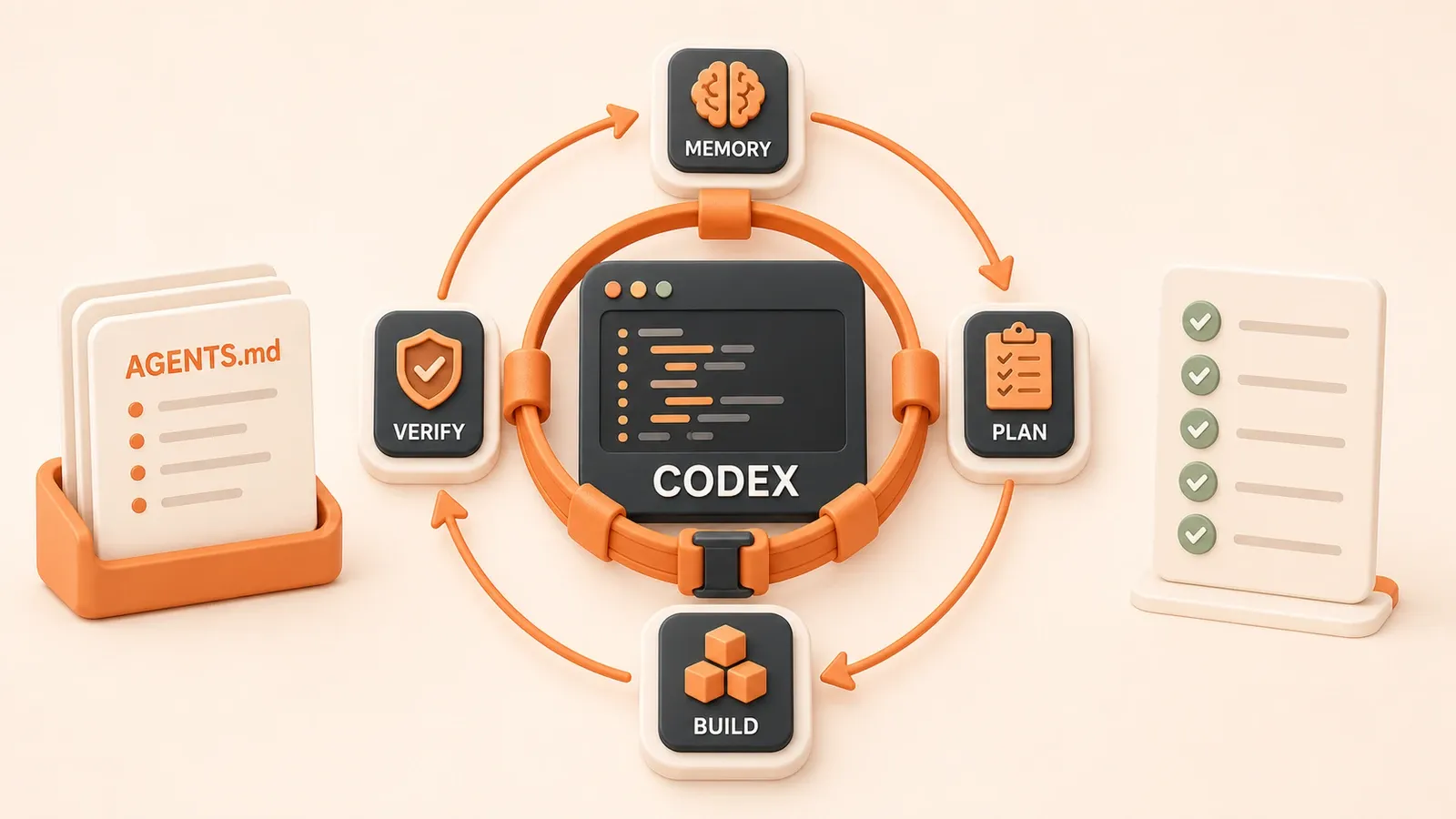
"The official LazyCodex documentation describes the four core commands, Codex Light positioning, Boulder state, five evidence gates, and ulw-loop iteration caps."
You change a feature spread across more than a dozen files. Codex reports that it is done, you trust the result, and production later exposes a missing error branch. This failure is common in complex repositories: every new conversation has to reconstruct the project, while an agent’s completion summary says what changed but may not reveal which edge cases it missed.
LazyCodex packages the parts of OmO (oh-my-openagent) that fit Codex as a lightweight agent-harness distribution. It focuses on project memory, work planning, and verified completion. Its four pillars are $init-deep, $ulw-plan, $start-work, and $ulw-loop: hierarchical AGENTS.md context, decision-complete planning, durable execution, and an evidence-bound verification loop.
What LazyCodex is: OmO’s lightweight Codex distribution
LazyCodex is to Codex roughly what a configured distribution is to its underlying editor. Its core capabilities come from oh-my-openagent (OmO), while LazyCodex packages the subset that fits the Codex plugin system. The GitHub project uses the MIT License. As of the July 2026 fact check for this article, the maintainers describe it as the Codex Light edition of OmO, not a complete port of OmO Ultimate.
The main differences between plain Codex and LazyCodex
| Concern | Plain Codex | LazyCodex (Codex Light) |
|---|---|---|
| Project memory | Context comes from the repository guidance and current session; there is no bundled deep-initialization workflow | $init-deep generates hierarchical AGENTS.md files with local guidance for complex directories |
| Completion criteria | Boundary checks depend on the task instructions and the habits used in that run | $start-work adds five evidence gates, while $ulw-loop uses oracle verification to make completion criteria explicit |
| Workflow discipline | You can edit directly or impose your own plan-first process | $ulw-plan plans, $start-work executes a plan, and $ulw-loop closes the evidence loop |
| Durable progress | Context persists through the project files and whatever the Codex session retains | .omo/boulder.json stores plan progress, and a Stop hook can continue unfinished work |
| Tooling layer | Codex uses the skills, MCP servers, and parallel features available in the current environment | The installer adds OmO rules, hooks, skills, LSP and AST search components, and model-routing configuration |
The harness does not change the underlying Codex model. It formalizes how the model is used: establish project context, plan, execute, and verify against evidence. One boundary matters here: OmO Ultimate’s full discipline-agent orchestration and team_* tools are not part of Codex Light. LazyCodex can fan out work only through the agent surface that the current Codex environment provides.
Installation: one npx command, no global package
The primary LazyCodex installation path uses npx; it does not require npm i -g:
# Standard installation
npx lazycodex-ai install

# Equivalent command with the OmO package and Codex platform specified
npx --yes --package oh-my-openagent omo install --platform=codex

# Unattended mode with autonomous permission configuration
npx lazycodex-ai install --no-tui --codex-autonomous

# Check the installation
npx lazycodex-ai doctor
The installer writes the Codex plugin cache and related configuration. The standard interactive flow asks whether to configure autonomous permissions. Because --codex-autonomous changes permission settings, use it only after reviewing the security boundary on that machine. After an install or upgrade, approve the OmO hooks in Codex’s startup review and start a new session so the plugin reloads.
Start with four commands:
$init-deep: generate hierarchical AGENTS.md context$ulw-plan: turn a request into a decision-complete plan that waits for approval$start-work: execute a plan while persisting progress$ulw-loop: keep executing and verifying one task
To inspect the installation first, run npx lazycodex-ai doctor, or read the official LazyCodex README and documentation.
Project memory: generate hierarchical AGENTS.md files with $init-deep
A large repository cannot be explained reliably in a single conversation. With hundreds of files and many modules, a new agent either repeats the exploration or edits without knowing the local constraints.
$init-deep creates landmarks for that repository. It:

- Walks the repository and reads the files that define how the project actually works
- Generates hierarchical AGENTS.md files at the root and in complex subdirectories
- Keeps local guidance close to the code it governs
- Gives later agents the applicable rules before they edit
The hierarchy matters because module-specific guidance belongs next to the module, not inside one oversized root file. When an agent enters that directory, it can read the relevant rules without filtering an entire repository manual.
This resembles the ideas in Agent Memory System Design, but the two are not identical. AGENTS.md is versioned project context rather than automatically recalled conversation memory. Both approaches still value hierarchy, local context, and persistence. The pattern is also close to the role of CLAUDE.md in Use One Configuration File to Constrain Claude: the AI reads the rules before it acts.
Generated AGENTS.md files are ordinary Markdown and require review. After a refactor, a directory-responsibility change, or a command update, rerun $init-deep or maintain the files manually. Automatically generated context is not a permanent source of truth.
Four commands: memory, planning, execution, and verification
The LazyCodex flow has four parts: initialize project memory, plan, execute, and verify. For an individual development task, the last three form the plan-execute-verify cycle.
$ulw-plan: write a plan and wait for approval
$ulw-plan "what to build"This command plans without writing product code. Its workflow includes:
- Interviewing you to clarify the request instead of treating an ambiguous phrase as an implementation specification
- Exploring the repository and distributing independent searches to parallel subagents
- Analyzing the gap between the current code and the target
- Writing
plans/<slug>.mdwith references, acceptance criteria, a QA plan, and commit boundaries - Setting
status: awaiting-approvaland waiting for approval
The defining constraint is that planning does not quietly turn into implementation. Set the scope and acceptance criteria first, then hand the approved plan to execution. Splitting Work with Subagents covers a related decomposition pattern; LazyCodex embeds that pattern in a planning workflow.
$start-work: execute a plan with durable state
$start-work [plan-name] [--worktree <absolute-path>]This command executes an approved plan until every top-level checkbox is complete. Its main features are:
- Durable Boulder state:
.omo/boulder.jsonpreserves progress across turns and sessions - A Stop hook: if the plan remains unfinished, the hook injects the next work cycle
- Parallel subagents: independent subtasks can fan out when the current Codex surface supports them
- Strict TDD and five evidence gates: plan reread, automated verification, manual QA, adversarial QA, and cleanup
- A progress ledger: execution and checkbox state remain recorded
When everything finishes, the workflow prints ORCHESTRATION COMPLETE. That message means the workflow claims all checkboxes and evidence gates have completed. You should still inspect the tests, manual QA, and change evidence rather than trusting a single status line.
$ulw-loop: keep one scoped task running until verified
$ulw-loop "task" [--completion-promise=TEXT] [--strategy=reset|continue]Use this command when the task is already well scoped but needs to keep running until its evidence passes. It does not replace full planning; run $ulw-plan first when the task is still ambiguous.
- Iteration cap: up to 500 iterations in ultrawork mode and 100 in normal mode
- Strategy:
resetresets loop context, whilecontinuecarries the current state forward - Completion promise: state the evidence to collect, the checks that must pass, and what to do when information is missing
- Stop condition: an oracle determines whether the evidence satisfies the completion promise
Iteration count is not a quality guarantee. A vague completion criterion only repeats a vague judgment more quickly. The useful part is putting tests, boundary conditions, manual QA, and failure handling into the completion promise.
Why acceptance checks matter in a complex repository
The usual risk in a complex repository is not that the main path fails immediately. A change spans a dozen files, the happy path works, but an error branch, caller, configuration file, or document remains stale. The problem is not only model capability; the definition of done lacks evidence.
Common blind spots include:
| Change type | Commonly missed work |
|---|---|
| Main-flow change | Network failures, parameter validation, permission errors, and other exceptional paths |
| New interface | Callers and test doubles that still use the old signature |
| Module refactor | Tests, configuration, documentation, and generated artifacts |
| Feature removal | Dependent entry points, analytics, logs, and migration shims |
LazyCodex does not guarantee that nothing will be missed. Its practical addition is to put checks into the workflow. The five evidence gates require a plan reread, automated verification, manual QA, adversarial checks, and cleanup. $ulw-loop keeps a scoped task moving until the agreed evidence is satisfied. Completion becomes a decision against predefined evidence rather than the agent’s own summary.
Those gates still need project-specific sources of truth and good acceptance criteria. A signature change requires checking every caller. Removing a feature requires checking its entry points. A UI change needs real interaction, not just unit tests. The harness supplies process discipline; it cannot infer every business risk.

OmO discipline agents and the LazyCodex skills layer
LazyCodex comes from OmO, but their capability boundaries must remain separate. OmO Ultimate provides the complete discipline-agent orchestration layer. Codex Light carries only the components that fit Codex’s plugin system and relies on Codex’s own agent surface.
Discipline agents: full orchestration belongs to OmO Ultimate
| Agent | Responsibility | LazyCodex Light boundary |
|---|---|---|
| Sisyphus | Orchestrates execution and verification work | Role configuration may be visible, but Light does not include OmO Ultimate’s full agent orchestration |
| Hephaestus | Implements changes in the repository | Independent work runs through whatever subagent capability the current Codex environment provides |
| Oracle | Judges completion against evidence | $ulw-loop preserves the evidence-verification habit but does not provide every Ultimate orchestration tool |
| Librarian | Records and retrieves context | Project memory primarily lands through $init-deep and hierarchical AGENTS.md files |
Do not count OmO Ultimate’s Team Mode, full discipline-agent team, or team_* tools as built-in LazyCodex Light capabilities. Whether you can create parallel team members depends on the current Codex App or CLI surface.
Skills: reusable workflows carry specialist judgment
LazyCodex installs a set of skills and components. The current official documentation lists representative capabilities such as:
| Skill or component | Purpose |
|---|---|
| review-work | Review the implementation through multiple lanes |
| remove-ai-slops | Remove templated AI-looking residue without changing behavior |
| frontend | Apply front-end design and UI implementation constraints |
| LSP | Run diagnostics and symbol-level definition, reference, and rename operations |
| AST-grep | Search and rewrite code by syntax structure |
| rules / comment-checker | Load project rules and check comment quality |
| git-bash | Supply compatible Bash semantics where the environment needs them |
This mirrors the design in Claude’s Skill Feature: commands own the process, while skills carry domain judgment. The exact skill list changes over time. Check the $ menu in Codex or the doctor output for the installed version rather than relying on a static list.
Model routing: allocate reasoning to task risk
LazyCodex configures model routing so roles and tasks can use appropriate models and reasoning levels. Its goal is not a promise to save tokens. The official documentation instead warns that the harness uses enough model capacity and context for planning, execution, and verification.
A safer operating rule is:
- Use a medium reasoning level for everyday work
- Increase reasoning for high-cost failures and review-heavy tasks
- Reserve the highest reasoning level for genuinely difficult work
- Split long tasks before one thread becomes overloaded with context
Model names and routing matrices change. Treat the installed configuration as the source of truth. Do not freeze a model name from one README revision into a long-lived process, and do not assume that multi-model routing always lowers quota use.
Four engineering ideas worth borrowing without LazyCodex
Even without installing LazyCodex, four of its engineering ideas transfer to other agent workflows.
Idea 1: write hierarchical context files for a large repository
$init-deep generates AGENTS.md files, but the underlying idea is simple: give a large repository versioned, hierarchical context.
- Put local guidance in complex directories instead of packing every rule into the root
- Let an agent see the applicable rules when it enters that directory
- Update the guidance when the repository structure or workflow changes
- Review generated context so stale statements do not become new failure sources
The minimum form is one root AGENTS.md plus a small number of files in the most constrained subdirectories. Use One Configuration File to Constrain Claude demonstrates a related pattern.
Idea 2: separate planning from execution
Ask the agent for a decision-complete plan with scope, dependencies, acceptance criteria, QA, and commit boundaries. Approve it before implementation. The important rule is not the plans/*.md pathname; it is that planning does not silently begin product changes.
Idea 3: bind completion to evidence
Create a checklist for cross-file changes: inspect callers after an interface change, entry points after feature removal, real interaction after a UI change, and rollback paths after a data migration. Tie completion to tests, manual QA, and boundary evidence instead of a prose summary.

Idea 4: allocate models and context by task risk
A simple query rarely needs the highest reasoning level. Architecture changes, migrations, and release gates need stronger reasoning and review. Long tasks also need deliberate decomposition; increasing the token budget alone is not enough.
The smallest version to copy
If you do not want the entire harness, keep two kinds of versioned files:
- A plan checklist with decisions, steps, acceptance criteria, and open questions
- Hierarchical AGENTS.md files with repository-wide and directory-level rules
Add the relevant verification commands and manual-QA checklist for each change type. That already captures the most portable parts of the LazyCodex approach.
Who should use it, and who should not
LazyCodex adds hooks, state files, skills, and workflow constraints. Not every project needs that layer. The following table makes the trade-off explicit.
Fit by scenario
| Dimension | LazyCodex is a good fit | Plain Codex is simpler |
|---|---|---|
| Repository size | Large repository with many directory rules and frequent cross-file changes | Small repository or single-file project |
| Task complexity | Long work that needs planning, execution, and verification | One-off edit or simple script |
| Context problem | New sessions repeatedly rediscover directories and rules | One session is enough and AGENTS.md is already clear |
| Acceptance needs | Error branches are easy to miss, so evidence gates and manual QA matter | Completion criteria are simple and cheap to check |
| Process needs | Plans should be approved first and execution state should persist | Direct editing is preferable and an extra state layer is unnecessary |
| Permission tolerance | You can review hooks, MCP servers, and autonomous-permission settings | You do not want another plugin or any Codex configuration changes |
How to judge the payoff
The larger the repository, the longer the task, and the more demanding the acceptance checks, the more useful LazyCodex’s process constraints can become. Common candidates include cross-file refactors, work that spans sessions, and high-risk changes that need automated tests plus manual QA.
The costs are equally concrete. You must maintain hierarchical context, understand hooks and permissions, accept state files such as .omo/boulder.json, and review the plans and verification results produced by the harness. Installation does not make it an automatic insurance policy against omissions.
Poor fits
- One-off edits: changing one function, one field, or a short block of copy
- Simple scripts: work confined to one or two files with an obvious stopping condition
- Mature existing workflows: the repository already has reliable AGENTS.md files, plan templates, CI, and manual acceptance gates
- No appetite for extra configuration: plugins, hooks, MCP servers, or autonomous permissions should not change the current Codex environment
If you are undecided, skip the complete installation at first. Add a hierarchical AGENTS.md structure and an evidence checklist manually. If cross-session context, plan execution, and verification remain recurring problems, then evaluate LazyCodex.
Conclusion
The difficult part of using Codex in a complex repository is often not generating code. It is helping a new session understand local rules quickly and proving that a cross-file change covered the important boundaries. LazyCodex combines $init-deep, plan approval, Boulder state, and evidence gates into a Codex Light workflow.
The useful part is not the Sisyphus or Boulder naming. It is three verifiable engineering changes: context lives in hierarchical files, planning and execution have an explicit boundary, and completion depends on tests plus manual QA. At the same time, LazyCodex is not OmO Ultimate; full agent orchestration and Team Mode cannot be counted as Light-edition features.
A practical next step is to run npx lazycodex-ai doctor, initialize one real large repository with $init-deep, and choose a well-scoped cross-file task. Run it through $ulw-plan, $start-work, and $ulw-loop, then compare omissions, context rereads, and acceptance cost with a plain Codex run. That comparison will tell you whether the harness belongs in your workflow.
Run a LazyCodex planning, execution, and verification cycle
Start with installation checks and project memory, approve the plan before execution, and accept the result only when its evidence passes.
- 1
Step 1: Install and run doctor
Install the Codex Light edition with npx lazycodex-ai install, then run npx lazycodex-ai doctor to check plugins, hooks, MCP servers, and configuration. - 2
Step 2: Initialize project memory
Run $init-deep in the repository. Review the root and directory-level AGENTS.md files, removing any stale or inaccurate guidance. - 3
Step 3: Create and approve a plan
For work with unresolved boundaries, run $ulw-plan so it can explore the repository and write a decision-complete plan. Approve the scope, acceptance criteria, and commit boundaries before execution. - 4
Step 4: Execute the plan
Use $start-work on the approved plan, track durable progress in .omo/boulder.json, and require every top-level checkbox to finish. - 5
Step 5: Verify completion with evidence
Use $ulw-loop when the task needs a persistent completion loop. Put tests, manual QA, and boundary checks in the completion promise, and accept completion only after the evidence passes.
FAQ
What is LazyCodex, and how is it different from using Codex directly?
How do I install and check LazyCodex?
When should I use $init-deep, $ulw-plan, $start-work, and $ulw-loop?
What do the AGENTS.md files generated by $init-deep do?
What kinds of projects are a good fit for LazyCodex?
14 min read · Published on: Jul 28, 2026 · Modified on: Jul 28, 2026

AI Agent Toolbox: Codex, Claude Code, Skills, and Gateways
If you landed here from search, the fastest way to build context is to jump to the previous or next post in this same series.
Previous
Continuum: What to Check When Choosing an OpenAI-Compatible Agent Runtime
Use ShyftLabs Continuum as a lens for choosing an agent runtime: orchestration, model routing, memory, MCP tools, durable execution, observability, and deployment governance for teams moving agents from notebooks to production.
Part 1 of 7
Next
Use macos-app-skills to Build Native Mac Apps with AI Agents
Install macos-app-skills, understand its build, native UI, Sparkle update, notch, and release modules, and choose the right Swift skill pack for your project.
Part 3 of 7


Comments
Sign in with GitHub to leave a comment