
DeepAgents Architecture: Planning Tools, Sub-agents, and File System
Why does your AI Agent always crash on complex tasks?
You ask it to research a technical topic, and after 20 steps the output quality starts to plummet. You have it refactor a codebase, and after hours of work it breaks features that were working fine. You ask it to write a long report, and halfway through it starts repeating itself.
I’ve been there. I once used a traditional Agent for deep research on LangGraph best practices. At first, the output was well-organized, but after thirty-something steps it started “forgetting”—materials I had already researched were gone, the analysis framework I’d established fell apart, and the final report was a jumbled mess of contradictions.
The root cause of all these problems is the same: traditional Agents are “Shallow.” They only execute single-step reactive actions, with no planning capability, no memory system, no task decomposition. It’s like asking someone to write a 5,000-word report without giving them an outline—they’re bound to go off the rails.
Yet Claude Code, Deep Research, and Manus can handle complex tasks—refactoring projects with thousands of lines of code, producing dozens of pages of structured research reports. What’s their secret?
The answer is Deep Agent architecture. LangChain has packaged this architecture into the DeepAgents library, and today we’re diving into its four pillars: Planning Tools, Sub-agents, File System, and System Prompts.
Why Do We Need Deep Agents?
Let’s start with a fact: traditional Agents see their success rate cut in half on tasks with more than 10 steps.
This isn’t speculation. Research from Prompting Guide shows that when task steps exceed 10, Shallow Agent output quality starts to decline noticeably. Why? Because they lack “brains.”
Traditional Agent design is reactive: receive instruction → call tool → return result. Each step is independent, with no long-term planning, no intermediate state management. It’s like asking someone to clean an entire house without telling them the order to clean rooms or letting them track which rooms are already done. They might half-clean the kitchen, suddenly run to the living room, then forget the kitchen isn’t finished.
Three classic crash scenarios:
Deep Research Tasks. You ask an Agent to research a technical topic like “LangGraph best practices in production.” It starts searching, reading docs, extracting information. After 20 steps, previously searched materials have been pushed out of the Context Window, and new search results overwrite the original analysis framework. The final output is an incoherent report.
Code Refactoring Tasks. You ask an Agent to refactor a project with thousands of lines of code. It modifies one module, then another, but there are dependencies between them—which it forgets. By the end, features that used to work are all broken.
Long-form Content Generation. You ask an Agent to write a 5,000-word technical article. Around word 2,000, it starts repeating points made earlier or drifting away from the original topic.
The core of all these problems is Context collapse.
Claude Code can handle refactoring projects with thousands of lines of code. Deep Research can produce dozens of pages of structured reports. Manus can complete complex multi-step tasks. They’re not magic—they use a unified structure: Deep Agent architecture.
Deep Agents give the Agent a “brain”—the ability to plan, decompose tasks, manage memory, and track progress. LangChain has packaged this architecture into DeepAgents. Let’s examine its design.
DeepAgents Four-Pillar Architecture
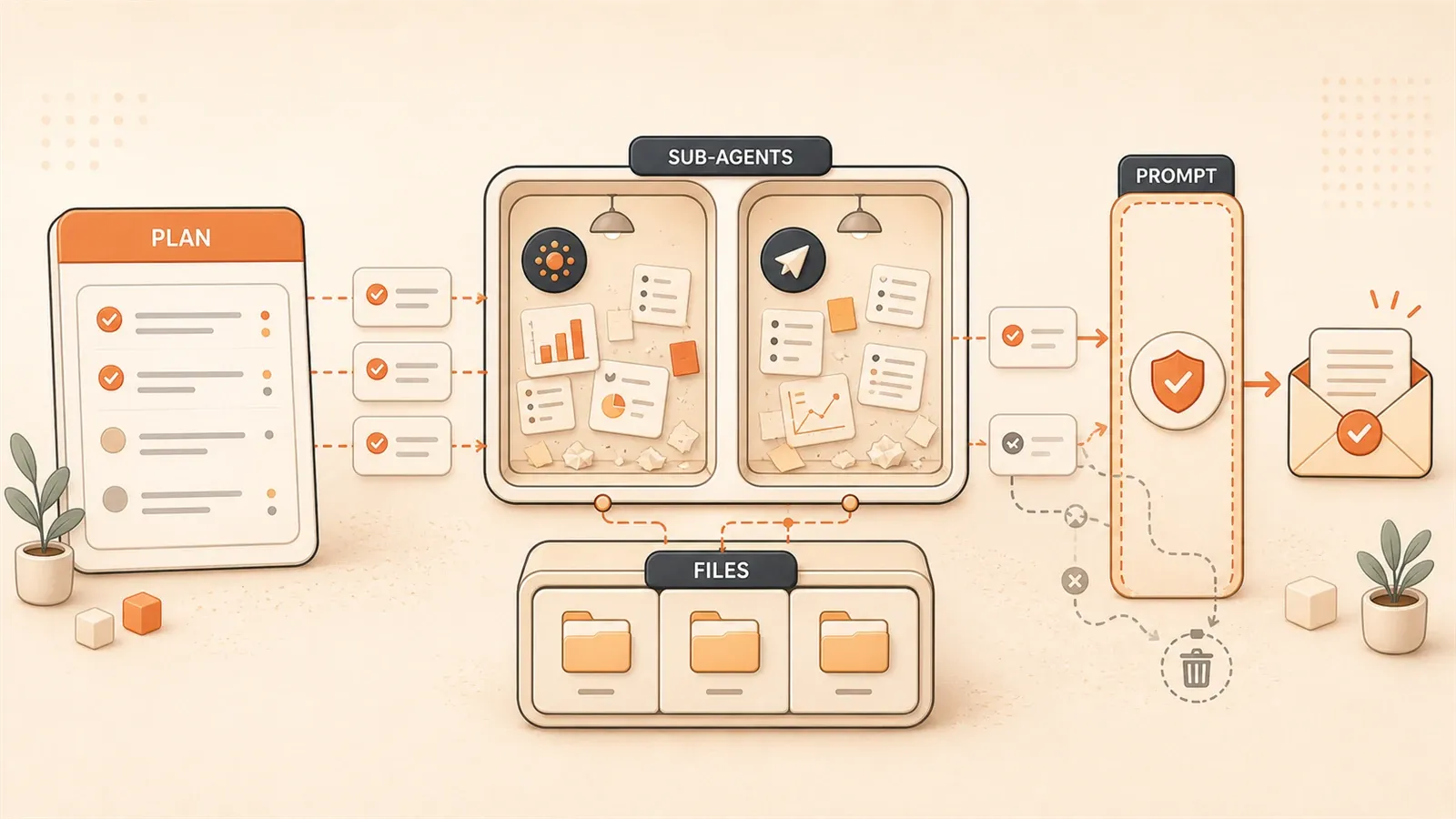
DeepAgents’ design philosophy is clear: break complex tasks into manageable units, each with clear responsibilities.
The four pillars work together: Planning Tools manage planning and progress tracking, Sub-agents enable specialization and Context isolation, File System solves memory storage, and System Prompts define behavioral boundaries. They’re like a symphony orchestra—with a conductor (Planning), different instrument sections (Sub-agents), sheet music storage (File System), and performance rules (System Prompts).
Planning Tools: Giving the Agent a “Brain”
The core of Planning Tools is todo_write.
Here’s how it works—it’s essentially a no-op (null operation). It doesn’t execute any actual tasks; it just creates and updates task lists. But these task lists serve as working memory through the Context Window, letting the Agent “see” its plans and progress throughout execution.

For example: you ask an Agent to do technical research. It first uses todo_write to create a plan:
- [ ] Search LangGraph official documentation
- [ ] Read LangGraph State Machine design
- [ ] Extract best practice examples
- [ ] Summarize core design patterns
- [ ] Output structured report
Each time a task is completed, the Agent updates this list, changing [ ] to [x]. This way, no matter how many steps are executed, the Agent can always see its progress—what’s done, what hasn’t started, what’s in progress.
This solves a core problem: long-term goal consistency.
When a traditional Agent reaches step 20, it may have already forgotten what the goal was at step 1. But a Deep Agent’s todo list is like a sticky note on the fridge, constantly reminding it “what exactly are you trying to do.”
"Claude Code and Manus both use this planning tool principle—using Context Window as working memory to keep Agents from losing direction"
Sub-agents: Specialization and Context Isolation
Sub-agents are Deep Agent’s second pillar.
The design logic: one main orchestrator handles overall planning and task distribution, while multiple specialized sub-agents execute specific tasks. Each sub-agent has its own Context Window, and after execution, only returns the final result to the orchestrator.
This brings four key advantages:
Context Preservation. The orchestrator’s Context Window isn’t polluted by sub-agent intermediate steps. When a traditional Agent executes a search task, it stuffs all search results, webpage content, and extraction processes into Context. But a Sub-agent, after execution, returns only a clean result—“here’s the key information I found.” The orchestrator’s Context stays clean.
Specialized Expertise. Each sub-agent can focus on one domain. The research_subagent specializes in information retrieval and extraction, writer_subagent specializes in content organization, coder_subagent specializes in code analysis. Specialization lets each sub-agent excel in its domain.
Reusability. The same sub-agent can be called by multiple orchestrators. For instance, research_subagent can be used in research tasks, writing tasks, and analysis tasks. Write once, use everywhere.
Fine-Grained Permissions. Sub-agents can have different permission boundaries. Some sub-agents can only read files, some can write files, some can access the network. Fine-grained permission control reduces security risks.
"The Orchestrator-Sub-agent architecture is recommended, also known as Task Decomposition Pattern—breaking complex tasks into subtasks, each handled by a dedicated processing unit"
How to implement this? DeepAgents provides a simple API:
from deepagents import create_deep_agent, create_subagent

# Define sub-agents
research_subagent = create_subagent(
    name="research",
    tools=[internet_search, read_url],
    description="Specializes in information retrieval and extraction"
)

writer_subagent = create_subagent(
    name="writer",
    tools=[write_file],
    description="Specializes in content organization and output"
)

# Create main Agent
agent = create_deep_agent(
    subagents=[research_subagent, writer_subagent],
    tools=[todo_write, read_file, write_file]
)
When the orchestrator calls a sub-agent, DeepAgents automatically handles Context switching and result passing.
File System: Breaking Through Context Window Limits
This is the core solution for Deep Agent memory management.
Context Windows have size limits. Claude has about 200K tokens, GPT-4 about 128K tokens. For short tasks, this is plenty. But for long tasks—like processing thousands of lines of code, reading dozens of documents—this space fills up quickly.
The File System Backend’s solution is clever: use file references instead of direct loading.
Instead of stuffing all content into the Context Window, the Agent stores intermediate results in the file system. When a file is needed, it’s loaded on-demand through the read_file tool. It’s like doing research—you don’t memorize all your references; you organize them into documents and open them when needed.
DeepAgents supports three Backends:
StateBackend. In-memory storage, suitable for test environments and short-term tasks. Agent state and intermediate results are stored in memory, gone after the session ends. Fast but not persistent.
FilesystemBackend. Local filesystem storage, suitable for production environments and scenarios requiring persistence. Agent intermediate results are written to local files, readable on next run. Persistent but depends on local storage.
StoreBackend. Cloud storage, suitable for enterprise deployments and scenarios requiring audit trails. Agent state is stored in cloud databases, supporting version control and audit logs. Reliable but complex to configure.
Which Backend to choose depends on your scenario. For quick testing, use StateBackend; for production deployment, use FilesystemBackend; for enterprise applications requiring audits, use StoreBackend.
FlowHunt’s Context Management Strategy comparison table explains these three modes clearly:
| Mode | Pros | Cons | Use Case |
|---|---|---|---|
| All-in-Context | Simple and direct | Context easily overflows | Short tasks |
| File-Based References | Saves Context space | Requires file management logic | Long tasks, production |
| Hybrid | Balances flexibility and efficiency | Complex configuration | Enterprise applications |
DeepAgents defaults to Hybrid mode—keeping key information in Context while storing large amounts of data in the filesystem.
System Prompts: The Underrated Key
System Prompts are the most overlooked of the four pillars.
Many people think a System Prompt is just a few simple instructions like “You are a helpful assistant.” But Deep Agent System Prompts are actually engineered documents of hundreds to thousands of lines.
Claude Code’s System Prompt is hundreds of lines long, defining complete tool calling specifications, file operation workflows, and code style constraints. Deep Research’s System Prompt is over a thousand lines, including research methodology, information extraction standards, and output format templates.
Why do we need such detailed System Prompts?
Because Agents encounter various edge cases during long tasks. Brief instructions can’t cover all scenarios. Detailed System Prompts serve to:
Define Behavioral Boundaries. When should you call todo_write, when should you delegate to a sub-agent, when should you return results directly? These rules need to be written in enough detail for the Agent to make correct judgments.

Standardize Tool Calling. How to use each tool, what the parameter format is, how to handle return results. For example, does the read_file tool parameter take a file path or file ID, and does it return raw content or a summary?
Set Output Formats. Different task types have different output format requirements. Research reports use Markdown structure, code refactoring uses diff format, content generation uses specific templates.
DeepAgents’ Middleware Architecture automatically injects System Prompts. You don’t need to manually write thousands of lines—the framework generates them based on your configuration. But understanding System Prompts’ role is important—they are the Agent’s behavioral “constitution.”
Now that we’ve covered all four pillars, let’s look at practical code.
DeepAgents Practical Code Analysis
Here’s a complete code example implementing a technical research Agent.
from deepagents import create_deep_agent, create_subagent
from langchain_community.tools import TavilyInternetSearch

# 1. Define tools
search_tool = TavilyInternetSearch(
    name="internet_search",
    description="Search the internet for information"
)

# 2. Define sub-agents
research_subagent = create_subagent(
    name="research",
    tools=[search_tool],
    system_prompt="You are an information retrieval expert. \
                   Your task is to search and extract key information. \
                   Return only structured research results, no intermediate steps.",
    description="Sub-agent responsible for information retrieval"
)

writer_subagent = create_subagent(
    name="writer",
    tools=[],  # writer doesn't need external tools
    system_prompt="You are a content organization expert. \
                   Your task is to organize research results and output structured reports. \
                   Use Markdown format with clear section structure.",
    description="Sub-agent responsible for content output"
)

# 3. Create Deep Agent
agent = create_deep_agent(
    subagents=[research_subagent, writer_subagent],
    tools=[todo_write, read_file, write_file],
    backend="filesystem"  # Use filesystem storage
)

# 4. Execute task
result = agent.invoke(
    "Research LangGraph best practices, \
     output a structured research report"
)
The execution flow looks like this:
Step 1: Plan. The Agent calls todo_write to create a task list.
todo_write([
    "Search LangGraph official documentation",
    "Read core architecture design",
    "Extract best practice examples",
    "Summarize design patterns",
    "Output structured report"
])
Step 2: Delegate. The Agent calls research_subagent to execute the retrieval task.
call_subagent("research", "Search for LangGraph best practices documentation")The research_subagent calls the internet_search tool, gets search results, extracts key information, and returns a clean structured result to the orchestrator. The orchestrator’s Context Window only receives a summary like “found 5 key best practices,” not all the raw content of search results.
Step 3: Update. The Agent updates the todo list, marking completion status.
todo_write([
    "[x] Search LangGraph official documentation",
    "[x] Read core architecture design",
    "[ ] Extract best practice examples",
    ...
])
Step 4: Continue Execution. The Agent calls writer_subagent to organize content, then write_file outputs the final report.
call_subagent("writer", "Organize research results, output report")
write_file("langgraph_best_practices.md", report_content)
The execution log looks like this:
[Step 1] todo_write: Created 5 task items
[Step 2] call_subagent(research): Started information retrieval
[Step 3] internet_search: Searched "LangGraph best practices"
[Step 4] read_url: Read 3 official documents
[Step 5] subagent_complete: research returned structured results
[Step 6] todo_write: Updated progress, 2 items completed
[Step 7] call_subagent(writer): Started content organization
[Step 8] subagent_complete: writer returned Markdown report
[Step 9] write_file: Output report to file
[Step 10] todo_write: All tasks completed
Throughout the process, the orchestrator’s Context Window stays clean—only task lists and summary results returned by sub-agents, no noise from intermediate steps.
This is the power of Deep Agent: structured workflows, Context management, specialized division of labor.
Comparison with Other Agent Frameworks
DeepAgents isn’t the only option. There’s also LangGraph, AutoGen, CrewAI, SmolAgents, and other frameworks. Each has different focuses and use cases.
Here’s a comparison table:
| Framework | Core Features | Use Cases | Learning Curve |
|---|---|---|---|
| DeepAgents | Planning + Memory + Sub-agents, complete package | Complex reasoning workflows, quick start | Low |
| LangGraph | Stateful workflows, strong low-level orchestration | Production Agent systems, fine-grained control | Medium |
| AutoGen | Multi-agent graphs, .NET support | Enterprise pipelines, Microsoft ecosystem | Medium-High |
| CrewAI | High-performance agent teams, role-playing | Production automation, team collaboration simulation | Medium |
| SmolAgents | Lightweight, code-first | Quick prototyping, simple tasks | Low |
A few key differences:
DeepAgents vs LangGraph. DeepAgents is a higher-level wrapper around LangGraph, focused on the Deep Agent pattern. It packages Planning Tools, File System Backend, and Sub-agent Management—you don’t need to build them yourself. LangGraph is more low-level, providing state machine and workflow orchestration capabilities where you define each node and edge, but you need to implement Memory and Planning yourself.
Simply put: for quickly building Deep Agents, use DeepAgents; for low-level customization, use LangGraph.
DeepAgents vs AutoGen. AutoGen is Microsoft’s framework, supporting multi-agent dialogue and pipeline orchestration. Its feature is agents can talk to each other, forming complex interaction patterns like debates and negotiations. DeepAgents leans toward task decomposition and execution; AutoGen leans toward agent collaboration and communication.
Simply put: for agent team collaboration and debate/negotiation, use AutoGen; for task decomposition and specialization, use DeepAgents.
DeepAgents vs CrewAI. CrewAI emphasizes “role-playing”—each agent has a different role (researcher, editor, programmer), collaborating to complete tasks. Similar to DeepAgents’ Sub-agent pattern, but CrewAI emphasizes character personas and interactions, while DeepAgents emphasizes task decomposition and isolation.
Simply put: for simulating team collaboration and role-playing, use CrewAI; for technical task decomposition, use DeepAgents.
DeepAgents vs SmolAgents. SmolAgents is Hugging Face’s lightweight framework, featuring code-first—Agents directly write Python code to execute tasks, rather than calling tools. Good for quick prototyping, but not for complex long tasks.
Simply put: for quickly trying a simple Agent, use SmolAgents; for complex long tasks, use DeepAgents.
"Framework choice depends on your scenario. DeepAgents is good for complex reasoning tasks, LangGraph for production systems, AutoGen and CrewAI for multi-agent collaboration, SmolAgents for quick idea validation. There’s no万能 framework, only the right one"
Production Deployment and Best Practices
Using DeepAgents in production requires attention to several key points.
Backend Selection Strategy
Selection logic for the three Backends:

StateBackend: Test environments, short-term tasks. The advantage is speed—all data in memory, no IO latency. The disadvantage is no persistence—Agent state is lost on restart. Suitable for unit testing, quick validation, short tasks.
FilesystemBackend: Production environments, persistence requirements. The advantage is reliability—data written to filesystem, readable after restart. The disadvantage is IO cost—file read/write is slower than memory. Suitable for production deployment, long tasks, persistence needs.
StoreBackend: Enterprise-level, audit trail requirements. The advantage is control—data stored in cloud databases, supporting version management and audit logs. The disadvantage is complexity—requires database connection configuration, permission management. Suitable for enterprise applications, compliance requirements, audit needs.
A configuration example:
from deepagents import create_deep_agent, FilesystemBackend

agent = create_deep_agent(
    subagents=[research_subagent, writer_subagent],
    backend=FilesystemBackend(
        base_path="/var/agent-state",  # Storage path
        max_file_size=10 * 1024 * 1024,  # Max 10MB per file
        cleanup_after_days=30  # Clean up old files after 30 days
    )
)
Sub-agent Granularity Design
Don’t over-decompose.
Some people decompose a research task into 10 sub-agents: search_google, search_bing, read_wikipedia, read_github, extract_summary, extract_quotes, format_markdown, check_citations… The result is the orchestrator spends more time calling sub-agents than actually executing tasks.
A reasonable design is 3-5 core sub-agents:
- research: Responsible for all information retrieval and extraction
- analysis: Responsible for data processing and logical reasoning
- writer: Responsible for content organization and output
- reviewer: Responsible for quality checking and verification (optional)
Each sub-agent has clear responsibility boundaries. The research sub-agent shouldn’t do content organization; the writer sub-agent shouldn’t do information retrieval. Clear responsibilities, clear calls.
Performance Optimization
Two key points:
On-demand File Reading. Don’t read_file all intermediate results at once. During execution, the Agent reads relevant files based on current task needs. DeepAgents’ file reference mechanism is designed for this—file paths are saved in Context, content is loaded only when needed.
Rational Use of Context Summarization. During long task execution, Context Window may accumulate a lot of content. DeepAgents supports automatic summarization of intermediate steps—compressing lengthy execution records into brief status descriptions. This saves Context space, but ensure summarization accuracy—key information can’t be lost.
agent = create_deep_agent(
    ...,
    context_management={
        "summarization_threshold": 50000,  # Trigger summarization at 50K tokens
        "preserve_last_n_steps": 5  # Keep detailed records of last 5 steps
    }
)
Error Handling and Validation
Deep Agents have long execution processes, so error probability is higher. Need error handling mechanisms:
LLM-as-a-Judge. Use another LLM to check Agent output quality. For example, a reviewer_subagent checks whether the report output by writer_subagent has logical gaps or missing information.
Human Intervention Points. Set human confirmation at key decision points. For example, after the Agent completes research, pause to wait for user confirmation on direction before continuing.
agent = create_deep_agent(
    ...,
    verification={
        "auto_verify": True,  # Enable auto verification
        "human_checkpoint": "before_output"  # Human confirmation before output
    }
)
Summary
Let’s review DeepAgents’ four pillars:
Planning Tools give Agents planning capability. todo_write uses Context Window as working memory, maintaining long-term goal consistency.
Sub-agents enable specialization and Context isolation. The orchestrator’s Context stays clean; sub-agent intermediate steps don’t pollute the main flow.
File System solves Context Window limits, using file references instead of direct loading, loading on-demand to save space.
System Prompts define Agent behavioral boundaries—hundreds to thousands of lines of engineered documents covering various edge cases.
These four pillars work together, evolving Agents from “reactive execution” to “structured reasoning.” Claude Code, Deep Research, and Manus’ success proves this architecture’s effectiveness.
Next steps:
- Try building your first long-task Agent with DeepAgents. The official GitHub repo has complete example code: langchain-ai/deepagents.
- Read the LangChain official documentation to learn more. DeepAgents documentation is at docs.langchain.com/oss/python/deepagents.
- Follow the AI Development in Practice series. More deep dives on Agent architecture coming, including LangGraph state machine design and Agent Memory system optimization.
FAQ
What's the difference between DeepAgents and LangGraph?
When should I use Sub-agents instead of a single Agent?
• Task exceeds 10 steps, Context prone to overflow
• Requires specialization (e.g., research, writing, code analysis)
• Intermediate steps pollute Context, but only summary results needed
• Requires fine-grained permission control (e.g., read-only, write-only, network access)
How do I choose between the three File System Backend modes?
• StateBackend: Test environments, short-term tasks—fast but not persistent
• FilesystemBackend: Production environments, persistence needs—reliable but has IO cost
• StoreBackend: Enterprise-level, audit trail needs—supports version control but complex configuration
What granularity should sub-agents be decomposed to?
What kind of tasks is DeepAgents suitable for?
16 min read · Published on: Apr 26, 2026 · Modified on: Jul 30, 2026

AI Agent Engineering: Architecture, Evaluation, and Recovery
If you landed here from search, the fastest way to build context is to jump to the previous or next post in this same series.
Previous
AI Agent Monitoring and Recovery: From Logs to State Machines
AI Agents failing in production with no way to debug? This complete guide covers structured logging, metrics, OpenTelemetry tracing, and state machine patterns for production-ready monitoring.
Part 15 of 16
Next
This is the latest post in the series so far.


Comments
Sign in with GitHub to leave a comment