
技術ブログの高インプレッション低クリックをどう直す?GA/GSC 週次運用 SOP
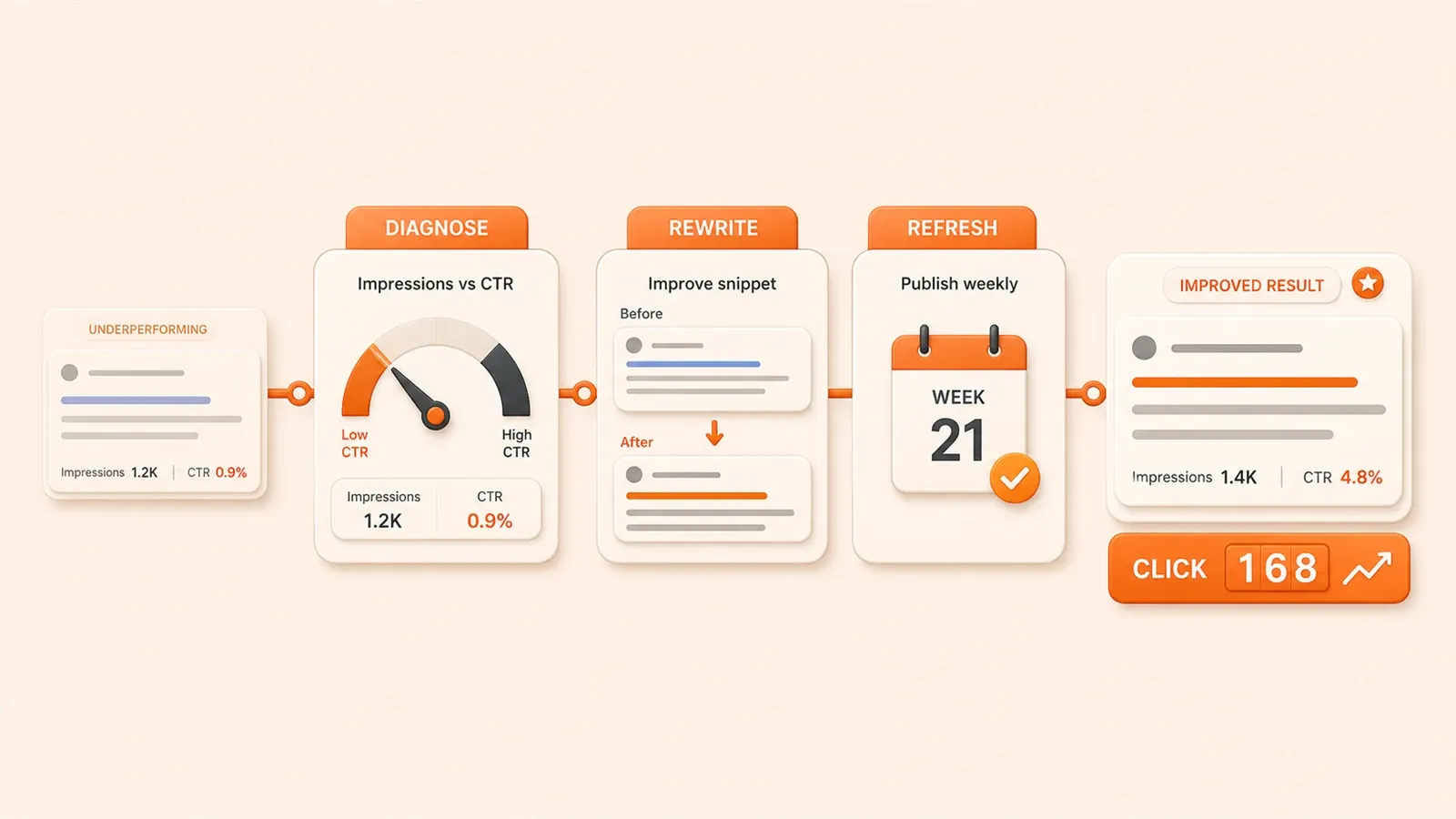
Google Search Console を開くと、ある記事のインプレッションが 5000 回なのに、クリックは 50 回にも届かない。数字が目に刺さる。
さらに混乱するのは、順位は悪くないし、内容にも時間をかけて書いたはずなのに、なぜインプレッションとクリックの差がこんなに大きいのか、という点です。
こうしたケースは本当に多い。技術ブログの運営者の多くが、順位とインプレッションばかり見て「露出があれば十分」と考えがちです。でも露出はトラフィックではなく、クリックこそがトラフィックです。
この記事では、週次運用 SOP を紹介します——月曜に問題ページを診断し、火曜に最適化、水曜に効果を検証する流れです。このフローを使ったあと、CTR の低かった数ページは 1.2% から 3.8% まで上がりました。派手な数字ではありませんが、確かな改善です。
{{< geo-tldr >}}
なぜ「高インプレッション・低クリック」になるのか:診断フレームワーク
まず厳しい現実から。ランキング位置がすべてを左右します。
光算科技のデータによると、検索結果 1〜4 位のページの CTR はおおむね 5% 以上に安定します。5〜10 位は 2〜5% のあいだ。10 位以降は 2% を超えるのも難しい。
ある記事は 12 位で、インプレッション 8000 回超、クリック 140 回。CTR は 1.8% にも届きません。当時はタイトルが弱いのかと考えていましたが、後から気づいたのは順位が本質だということ。12 位では、ユーザーはそもそも目に留めてくれません。
だから最初に見るのは平均順位です。
平均順位が 10 位超なら、問題はタイトルよりランキング不足の可能性が高い。コンテンツ品質の向上、被リンク獲得、ページ読み込み速度の改善など、順位を上げる施策を優先しましょう。
一方、平均順位が 5〜10 位、あるいはそれより前なのに CTR が 2% 未満。ここからが本題です。
タイトルが説明書で、フックになっていない
技術ブログに多いのが、タイトルが堅すぎること。
「React Hooks チュートリアル」のようなタイトルは、検索結果を流し見するユーザーには何も伝わりません。似たチュートリアルが十数本ある中、なぜあなたの記事をクリックするのか。
Meta Tags の 2026 年レポートでは、数字入りタイトルは純テキストより CTR が 36% 高いと報告されています。「React Hooks の 5 つのよくある間違い」のほうが、「React Hooks 使い方チュートリアル」よりクリックされやすい、ということです。
技術ブログの読者は精読よりスキャン。小見出しを素早く拾い、要点だけ取りに来ます。タイトルで「この記事で何が解決できるか」が伝われば、CTR は自然と上がります。
コンテンツと検索意図のズレ
こちらは目立ちにくいが、GA が教えてくれます。
例:ユーザーが「React Hooks チュートリアル」を検索し、入門記事を期待している。ところが記事は「React Hooks 原理の深掘り」で、内部実装寄り。30 秒で離脱——求めていたものではなかった。
GA の平均滞在時間と直帰率がこれを映します。滞在が短く直帰率が高いページは、コンテンツと検索意図が合っていない可能性が高い。
GA + GSC 連携診断:問題ページを見つける
GSC だけでは不十分。GA と組み合わせて初めて、片方だけでは見えない問題が浮かび上がります。
Warehows の記事でも、GA + GSC のクロス分析が隠れた改善機会を見つけると説明されています。

GSC のフィルター条件
Google Search Console の「検索結果」レポートを開き、だいたい次の条件で絞り込みます。
- 期間:過去 28 日(安定しつつデータ量も確保)
- 表示回数 > 10000(インプレッションの大きいページを優先)
- CTR < 1.5%(明らかに CTR が低い)
百家号でも似た基準が紹介されていますが、実測ではこの閾値が扱いやすい。数百回程度の露出ではブレが大きく、効果も見えにくい。まずは高インプレッション低 CTR の「大口」に集中しましょう。
絞り込んだら候補リストが出ます。次は各 URL を GA と照合します。
GA で補うデータ
GSC は「露出とクリック」、GA は「流入後に何が起きたか」を教えてくれます。
重点指標は 2 つ。
- 平均滞在時間:30 秒未満なら、内容を読んでいない可能性が高い
- 直帰率:80% 超なら、期待と内容がずれているサイン
ある記事は GSC でインプレッション 12000、CTR 1.1%。一見タイトル問題に見えました。ところが GA では平均滞在 22 秒、直帰率 87%。
問題はタイトルではなくコンテンツ。クリックしたユーザーが求めていたものと違い、すぐ離脱したのです。
データのクロス検証
GSC と GA を並べると、典型的には 3 パターンに分かれます。
| GSC データ | GA データ | 問題タイプ |
|---|---|---|
| 平均順位 > 10、CTR < 2% | 滞在時間は正常 | ランキング問題。コンテンツ品質を上げる |
| 平均順位 5〜10、CTR < 2% | 滞在時間 > 1 分 | タイトル問題。訴求力を高める |
| 順位は上位、CTR は低め | 滞在が短く、直帰率が高い | 意図のズレ。コンテンツの方向性を見直す |
この診断フレームができたら、週次の固定フローに移れます。
週次運用 SOP:月曜診断、火曜最適化、水曜検証
このフローは 3 日に分け、1 日 1 テーマに集中します。データに溺れず、各ステップの目標がはっきりするのが利点です。
月曜診断(30 分)
月曜の朝は GSC でデータをエクスポートし、GA と突き合わせる習慣にしています。
ステップ 1:GSC で候補ページをエクスポート
前述の条件(過去 28 日、表示回数 > 10000、CTR < 1.5%)で CSV を出します。
ステップ 2:GA で各ページを確認
候補 URL を GA の「ページ分析」に入れ、滞在時間と直帰率を見ます。
ステップ 3:優先度を付ける
平均順位で 3 段階に分けます。
- P0:平均順位 > 10 —— 順位が低すぎる。まずランキングを上げる
- P1:平均順位 5〜10 —— タイトル改善の余地あり
- P2:平均順位 < 5 —— 順位は良いのに CTR が低い。タイトルか description が平坦な可能性
一度に 5〜10 ページ出ても、優先して手を付けるのは 3 ページ程度。量より質です。
火曜最適化(45 分)
火曜は診断ではなく、改善に時間を使います。
P0 ページの最適化
平均順位 10 位超では、タイトルよりコンテンツ品質と被リンクが中心です。
- 内容が十分深いか、独自の視点があるか確認
- 内部リンクを追加し、関連記事とつなぐ
- 技術チュートリアルならコード例やスクリーンショットを足して完成度を上げる
GSC PAP の記事でも、AI で週次 SEO ヘルスチェックを行い、「伸びしろはあるが順位不足」のページを特定してコンテンツを強化する、という考え方が紹介されています。
P1 ページの最適化
平均順位 5〜10 位では、タイトルが突破口です。
タイトル案を 2〜3 個用意し、1 つ試して変更。具体的な書き方は次章で詳述します。
P2 ページの最適化
順位はすでに上位。問題になりやすいのは次の点です。
- タイトルが説明書調でフックが弱い
- meta description が平坦で、「クリックすると何が得られるか」が伝わらない
- 構成が散漫で、スキャンしても要点が見つからない
ここでは「フック」——タイトルと description を、注意を引く表現に変えることが重点です。
水曜検証(15 分)
水曜は短時間で十分。前週の変更の効果を確認します。
GSC で過去 7 日の CTR を見ます。1.2% から 2.5% に上がれば方向性は合っています。変化がなければ、あるいは下がれば、変更内容を見直しましょう。
A/B テスト用のタイトル案も用意しておきます。GSC に本格的な A/B 機能はありませんが、タイトルを手動で差し替え、1 週間観察してから別案に切り替える、というやり方で経験値は積めます。
最後に、今週の結果を運用ログに残します。

- ページ URL
- 旧タイトル / 新タイトル
- 旧 CTR / 新 CTR
- 平均順位の変化
この蓄積が、自分のブログに合ったタイトルの型を見つける助けになります。
タイトル最適化の実践:技術ブログ向け 5 つの公式
タイトル変更は運任せにできません。
試したパターンの中で、技術ブログ向けに安定して効いた 5 つを紹介します。
公式 1:数字 + 課題提示
「SEO 初心者で流入が伸びない?3 つのタイトル公式ですぐ使える」
課題(流入がない)を先に置き、解決策(3 つの公式)と「すぐ使える」でハードルを下げる構成です。
技術ブログの読者は、明確で実行可能な答えを好みます。「すぐ使える」は思考コストを下げる言い回しです。
光算科技の記事でも、タイトルに数字を入れると CTR が上がると述べられています。数字は 3〜7 個が目安。1 つでは物足りず、20 個は読む負担が大きい。
公式 2:疑問形で始める
「タイトルが順位を取れないのはなぜ?見落としがちな 2 つの細部」
疑問文は好奇心を刺激します。「なぜ」で始めると、答えを知りたくなる。
後半の「見落としがちな 2 つの細部」は、問題が小さいと示唆。「タイトル順位の原理を深掘り解析」より、「たった 2 点直せばいいかも」と感じさせやすい。
ただし疑問文は長くしすぎない。「なぜ技術ブログのタイトルが検索エンジンで理想的な順位を獲得できないのか?」は冗長で、スキャン時にスキップされやすい。
公式 3:具体的な質問
「新サイトの SEO、第一歩は何から始める?」
ユーザーが頭の中で持っている具体的な疑問に、そのまま答える形です。
「SEO はどこから」「タイトルはどう直す」「キーワードはどう選ぶ」——検索意図がはっきりしているクエリほど、タイトルで質問をそのまま出すとマッチしやすい。
「SEO チュートリアル」のような泛泛としたタイトルより CTR は出やすい。
光算科技の提案どおり、キーワードは前寄せ。「SEO 第一歩」を冒頭に置けば、関連性が一目でわかります。
公式 4:年号を入れる
「2026 年最新 SEO タイトルルール:もう使わない 5 つの言い回し」
年号は 2 つを伝えます。
- 内容が新しい(古い記事ではない)
- ルールが変わった可能性があり、見る価値がある
W3MarketingHub の 2026 年 5 月の記事でも、データ駆動のコンテンツ刷新ワークフローがトレンドになっていると述べられています。特に技術系では鮮度への関心が高い。
2024 年執筆の記事でも中身が有効なら、タイトルに「2026」「最新」を足すだけで CTR が改善することがあります。
公式 5:口語調
「キーワードはタイトルにどう入れる?初心者でも一目でわかる」
口語調は読みやすく、教科書感を弱めます。
「キーワードのタイトル配置戦略に関する研究」のような学術調だと、「長文を読む羽目になる」と敬遠されがち。
「どう入れる」に変えると軽く感じられ、「初心者でも一目でわかる」で難しさの印象をさらに下げられます。
ただし度は重要。「キーワード入れる超簡単、秒で理解」は大げさすぎて、かえって信頼を損ないます。
まとめ:タイトル長とキーワード位置
CSDN の記事でも、次の点が整理されています。
- 長さは 50〜60 文字程度(長すぎると SERP で切れる)
- キーワードは前半へ(最初の 20 文字以内)
- キーワード詰め込みは避ける(主キーワード 1 つで十分)
私は主キーワードをタイトル先頭 15 文字以内に置き、関連性を一瞬で伝えるようにしています。

「説明書」から「フック」へ:description 最適化のコツ
タイトル以外に、meta description も CTR に効きます。
SearchScaleAI の記事でも、meta description はランキングアルゴリズムに直接は効かないが CTR には効く、と説明されています。平淡な description だと、スキップされやすい。
タイトルの繰り返しは避ける
description でタイトルと同じことを言い直す人が多い。
タイトルが「React Hooks の 5 つのよくある間違い」なのに、description が「本文では React Hooks の 5 つのよくある間違いと解決方法を紹介します」——意味が薄い。
ユーザーはタイトルをすでに見ています。description ではタイトルにない価値を足す。
例:「この記事では 5 つの間違いそれぞれのコード例と修正方法を掲載——どれも実行可能なサンプル付き。」
ユーザーが知りたいのは「何があるか」だけでなく「読むと何の得があるか」です。
動詞で始める
「探索する」「取得する」「学ぶ」「発見する」——動詞は行動イメージを与えます。
「React Hooks の 5 つのよくある間違いを探索する」は、「React Hooks の 5 つのよくある間違いの紹介」より生き生きします。
末尾に軽い行動喚起を添えることもあります。「具体的なコード例を見る」「そのままプロジェクトに適用する」など。
「今すぐクリックして無料トライアル」のようなセールス調ではなく、技術コンテンツに合った表現に留めましょう。
155 文字前後に収める
80 文字程度だと情報量不足。180 文字超だと SERP で切れ、全文が伝わりません。
150〜155 文字前後が、検索結果に収まりやすい目安です。
百家号の記事でも、FAQ 構造化データで SERP の占有面積が 20〜30% 増えることが紹介されています。FAQ コンテンツがあるページは、構造化データマークアップを検討する価値があります。
まとめ:週次運用の習慣をつくる
「数字を見て途方に暮れる」から「体系的に改善する」へ。必要なのは固定フローです。
この週次 SOP はシンプルです。
- 月曜診断:GSC + GA で問題ページを絞り、優先度を付ける
- 火曜最適化:P0/P1/P2 に応じてコンテンツ・タイトル・description を直す
- 水曜検証:効果を確認し、運用ログに記録
数か月続けてきて、一番変わったのは CTR の数字より心構えです。以前は高インプレッション低 CTR の記事を見ても手が打てませんでした。今は問題の所在と打ち手が見える。
今週から 1 回、試してみてください。
全問題ページを一度に直す必要はありません。まず 2〜3 ページから。数週間続けると、効くタイトル公式や、問題が出やすいコンテンツタイプが自分なりに見えてきます。
その経験は、どの SEO チュートリアルより価値があります。
{{< geo-faq >}}
FAQ
ページのインプレッションは高いのに CTR が低いのはなぜ?
GA と GSC を組み合わせて問題ページをどう診断する?
週次運用 SOP の具体的な流れは?
技術ブログのタイトル最適化で有効な公式は?
meta description をどう最適化すれば CTR が上がる?
6分で読めます · 公開日: 2026年5月26日 · 更新日: 2026年7月14日


コメント
GitHubアカウントでログインしてコメントできます