
How to Fix High-Impression Low-Click Pages on Tech Blogs: GA/GSC Weekly SOP
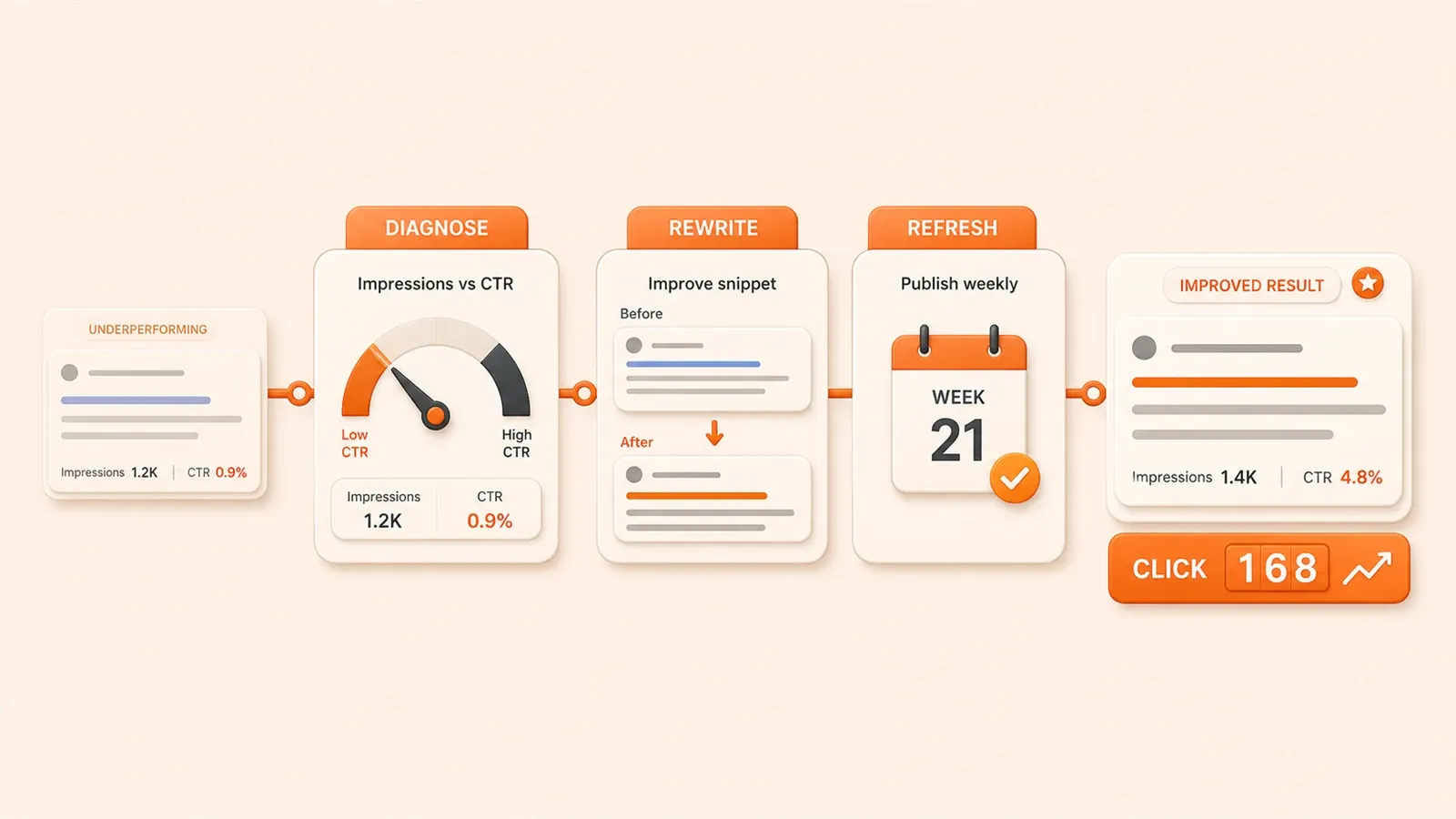
You open Google Search Console: 5,000 impressions, fewer than 50 clicks. The gap hurts.
Ranking looks fine; the article took real effort. Why do impressions and clicks diverge so much?
Common trap—watching rank and impressions and calling it a win. Impressions are not traffic; clicks are.
This is a weekly SOP: Monday diagnose weak pages, Tuesday fix titles or content, Wednesday check movement. On my blog several low-CTR URLs moved from about 1.2% to 3.8%—not viral, but real.
{{< geo-tldr >}}
Why Your Pages Have “High Impressions Low Clicks”—Diagnosis Framework
Let’s start with a harsh truth: ranking position determines everything.
According to data from GuangSuan Tech, pages in positions 1-4 have CTR consistently above 5%. Positions 5-10 struggle between 2-5%. Pages beyond position 10 find it hard to break 2%.
I had an article ranked at position 12, with over 8,000 impressions and only 140 clicks. That’s CTR below 1.8%. At first I thought the title wasn’t attractive enough, then I realized—ranking is the key. At position 12, users simply don’t see you.
So step one: check average position.
If average position > 10, the problem is most likely ranking too low, not the title. In this case, prioritize improving ranking—enhance content quality, build backlinks, optimize page load speed.
But if average position is 5-10 or better, yet CTR is below 2%, that’s interesting.
Title Sounds Like Documentation, Not a Hook
Tech blogs have a common flaw: titles are too formal.
A title like “React Hooks Tutorial” gets scanned past in search results—users can’t tell what makes this article special. There might be a dozen similar tutorials, so why click yours?
A 2026 Meta Tags report found that titles with numbers get 36% higher click rates than plain text titles. “5 Common React Hooks Mistakes” gets clicked more than “React Hooks Usage Tutorial.”
Tech blog readers have another habit: scanning. They don’t carefully read every paragraph—they quickly scan subheadings and grab key info. If your title directly tells them “what problem this article solves,” click rates naturally go up.
Content-Search Intent Mismatch
This problem is more subtle, but GA can help you spot it.
Example: user searches “React Hooks tutorial,” expecting an intro tutorial. But you wrote “React Hooks Principles Deep Dive,” focusing on low-level concepts. User clicks in, stays 30 seconds, leaves—not what they wanted.
GA’s average dwell time and bounce rate reflect this. If a page has short dwell time and high bounce rate, content probably doesn’t match search intent.
GA + GSC Joint Diagnosis: Find Problem Pages
Just looking at GSC isn’t enough—you need to combine it with GA. Each tool has its strengths, and using both reveals issues neither shows alone.
A Warehows article specifically covered this: GA+GSC joint analysis uncovers hidden optimization opportunities.

GSC Filter Criteria
Open Google Search Console, go to “Search Results” report. I usually use these filters:
- Time range: past 28 days (stable enough, sufficient data volume)
- Impressions > 10,000 (prioritize high-exposure pages)
- CTR < 1.5% (clearly low click rate)
Someone on Baijiahao recommended similar filter standards—after testing, this threshold works well. Pages with too few impressions (like a few hundred) have volatile data, optimization effects aren’t obvious. Focus on the high-exposure low-CTR “big accounts” first.
After filtering, you’ll see a candidate list. Next step: put each page into GA for comparison.
GA Supplementary Data
GSC tells you “impressions and clicks,” GA tells you “what happened after users entered.”
Focus on two metrics:
- Average dwell time: If < 30 seconds, users probably didn’t seriously read content
- Bounce rate: If > 80%, content doesn’t match user expectations
One article on my blog showed GSC impressions 12,000, CTR 1.1%. Looks like a title problem. But GA showed average dwell time only 22 seconds, bounce rate 87%.
Problem isn’t the title—it’s the content. Users click in, realize it’s not what they want, leave immediately.
Data Cross-Validation
Putting GSC and GA data together reveals three typical diagnoses:
| GSC Data | GA Data | Problem Type |
|---|---|---|
| Avg position > 10, CTR < 2% | Normal dwell time | Ranking issue—improve content quality |
| Avg position 5-10, CTR < 2% | Dwell time > 1min | Title issue—optimize appeal |
| Good position, low CTR | Short dwell, high bounce | Content-intent mismatch—adjust positioning |
With this diagnosis framework, next is the weekly fixed-time optimization workflow.
Weekly SOP: Monday Diagnosis, Tuesday Optimization, Wednesday Verification
I split this workflow into three days, each focused on one thing. Benefit: won’t get drowned in data, every step has clear goals.
Monday Diagnosis (30 minutes)
Monday morning, I habitually open GSC to export data, then check GA.
Step 1: GSC export candidate pages
Use the filter criteria mentioned (past 28 days, impressions > 10,000, CTR < 1.5%) to export a CSV.
Step 2: Check GA data one by one
Put candidate page URLs into GA’s “page analysis” to view dwell time and bounce rate.
Step 3: Mark priorities
I categorize by average position:
- P0: Avg position > 10 — ranking too low, fix ranking first
- P1: Avg position 5-10 — title has optimization opportunity, try changing it
- P2: Avg position < 5 — ranking great but click rate low, check if title or description is too plain
Usually filters 5-10 candidate pages, I pick 3 to prioritize. Limited energy, can’t handle too many.
Tuesday Optimization (45 minutes)
Tuesday spends time on optimization, not diagnosis.
How to optimize P0 pages?
Pages with avg position > 10, focus isn’t changing title—it’s improving content quality and backlinks.
I do these things:
- Check if content is deep enough, has original insights
- Add a few internal links, connect the page with other related articles
- If it’s a tech tutorial, add code examples or screenshots to make content more complete
A GSC PAP article covered using AI for weekly SEO health checks—core idea is identifying “potential but under-ranked” pages, targeted quality improvement.
How to optimize P1 pages?
Pages with avg position 5-10, title is the breakthrough point.
I prepare 2-3 title versions, pick one to try. Specific title optimization covered in next chapter.
How to optimize P2 pages?
Average position already great, now the problem might be:
- Title written like documentation, no appeal
- meta description too plain, doesn’t tell users “what they get by clicking”
- Content structure messy, users can’t find key points scanning
These pages’ optimization focus is “hook”—change title and description to versions that grab user attention.
Wednesday Verification (15 minutes)
Wednesday doesn’t need much time—quickly check last week’s optimization results.
Open GSC, look at past 7 days’ data changes. If CTR improved (say from 1.2% to 2.5%), optimization direction was right. If no change or dropped, reflect on whether the change was wrong.
I also prepare A/B test title versions. GSC doesn’t support real A/B testing, but you can manually swap titles, observe for a week, then swap another version. Slower, but accumulates experience.
Final step: log this week’s optimization results to operations journal. Record includes:

- Page URL
- Original title / New title
- Original CTR / New CTR
- Average position change
This accumulated data helps you discover title patterns for your own blog.
Title Optimization Practice: 5 Title Formulas for Tech Blogs
Changing titles can’t rely on luck—needs method.
I’ve tried many title patterns, some work consistently, some don’t. These five formulas I’ve tested and proven effective, suitable for tech blog scenarios.
Formula 1: Number + Pain Point
“New to SEO and no traffic? 3 title formulas to copy directly”
This formula’s characteristic: first point out pain point (no traffic), then give solution (3 formulas), emphasize “copy directly”—implies users don’t need to think, just copy.
Tech blog readers like clear, actionable answers. “Copy directly” phrasing lowers their mental barrier.
GuangSuan Tech’s article also mentioned adding numbers to titles clearly improves click rates. Recommend numbers between 3-7—too small (1) seems thin, too large (20) looks exhausting.
Formula 2: Question Opening
“Why does your title have no ranking? Just missed these 2 details”
Questions spark curiosity. “Why” opening, users naturally want to know the answer.
Second half “just missed these 2 details” gives a hint: problem isn’t big, just two details. More appealing than “deep analysis of title ranking principles”—users feel “oh, it’s that simple.”
But watch out—questions can’t be too long. If written as “Why doesn’t your tech blog title achieve ideal ranking performance in search engines?”—too wordy, users scan past.
Formula 3: Specific Problem
“What exactly should be the first SEO step for a new website?”
This formula’s benefit: directly answers the question users want to ask.
Many people searching SEO-related content have a specific question in mind. Like “where to start SEO,” “how to change titles,” “how to pick keywords.” If your title directly points out this question, match rate is high.
Better click rate than generic titles like “SEO Tutorial.”
GuangSuan Tech’s advice: put keywords as forward as possible. Like “SEO first step” at title opening—users can instantly judge if this article relates to what they’re looking for.
Formula 4: Add Year
“2026 Latest SEO Title Rules: These 5 Words Stop Using”
Year conveys two messages:
- Content is latest, not an old article from years ago
- Might have new changes, worth checking
A W3MarketingHub article from May 2026 mentioned data-driven content refresh workflows are becoming a trend. Users care more about content timeliness, especially tech content.
If your article was written in 2024, still works now, but adding “2026” or “Latest” to title helps click rate.
Formula 5: Conversational Style
“How to put keywords in title? Beginners get it instantly”
Conversational titles benefit: read easily, not like textbook.
Tech blogs easily make the mistake of writing academic-style titles: “Research on Keyword Placement Strategy in Titles.” Users see this, mental expectation is “another long article to slog through.”
Change to “how to put in title,” tone relaxes. “Beginners get it instantly” further lowers barrier—implies content isn’t hard, suitable for beginners.
But conversational has a limit. If written as “keyword placement super simple, instant understanding”—too exaggerated, actually seems unprofessional.
Summary: Title Length and Keyword Position
A CSDN article summarized title optimization key points:
- Length控制在 50-60 characters (too long gets cut off)
- Keywords尽量前置 (within first 20 characters)
- 避免堆砌关键词 (one is enough)
I usually put main keyword within first 15 characters of title, ensuring users can instantly judge relevance.

From “Documentation” to “Hook”: Description Optimization Tips
Beyond titles, meta description matters too.
A SearchScaleAI article mentioned: meta description doesn’t directly participate in ranking algorithm, but affects click rate. If description is written plainly, users might skip.
Don’t Repeat Title
Many people writing description repeat title content.
Like title “5 Common React Hooks Mistakes,” description written as “This article introduces 5 common React Hooks mistakes and solutions.”
This approach isn’t useful. Users already saw the title—description should give content the title didn’t say.
I switch angle: “Open this article, you’ll see specific code examples and fix solutions for these 5 mistakes—each mistake has runnable code.”
Users think not just “what content,” but “what’s the use of reading.”
Start with Verbs
“Explore,” “Get,” “Learn,” “Discover”—these verbs give users a sense of action.
“Explore 5 Common React Hooks Mistakes” has more energy than “Introduction to 5 Common React Hooks Mistakes.”
I also add a light action guide at description end, like “check specific code examples” or “apply directly to your project.”
Not marketing-style “click now for free trial”—phrasing matching tech content.
Character Count Around 155
Too short (like 80 characters) seems insufficient info. Too long (like 180 characters) gets cut off—users can’t see full content.
I usually write 150-155 characters, just enough for full display in search results.
A Baijiahao article mentioned FAQ structured data can increase search result “footprint” by 20-30%. If your page has FAQ content, consider adding structured data markup to make search results more prominent.
Summary: Build Your Weekly Operations Habit
From “staring at data worrying” to “systematic optimization” needs a fixed process.
This weekly SOP isn’t complicated:
- Monday diagnosis: GSC + GA filter problem pages, mark priorities
- Tuesday optimization: handle P0/P1/P2 by category, change titles, adjust content
- Wednesday verification: check results, log to operations journal
After using this workflow for months, biggest change isn’t CTR numbers—it’s mindset. Before, seeing high-impression low-click articles, just felt helpless. Now at least know where the problem is, how to fix.
Suggest you start trying this week.
Don’t optimize all problem pages at once—pick 2-3. After a few weeks, you’ll gradually discover your own patterns—which title formulas work, which content types tend to have issues.
This experience is worth more than any SEO tutorial.
{{< geo-faq >}}
FAQ
Why does my page have high impressions but low click rate?
How to use GA and GSC together to diagnose problem pages?
What's the specific weekly SOP workflow?
What are effective title formulas for tech blogs?
How to optimize meta descriptions for better click rates?
11 min read · Published on: May 26, 2026 · Modified on: Jul 14, 2026

Google Search Console Guide
If you landed here from search, the fastest way to build context is to jump to the previous or next post in this same series.
Previous
GSC Index Coverage Improvement: Practical Diagnosis and Error Fixes from 30% to 85%
A systematic approach to resolving Google Search Console index coverage issues. Detailed fixes for 5 common error types, Indexing API configuration steps, and weekly monitoring strategies. Real results: increased indexed pages from 42 to 71 in 21 days with 138% impression growth.
Part 4 of 5
Next
This is the latest post in the series so far.


Comments
Sign in with GitHub to leave a comment